How to use custom canonical URLs in WordPress
First published on December 19, 2011
WordPress has been automatically adding canonical URL tags to individual posts and pages since version 2.3. For many reasons, such as duplicating content across domains, especially when syndicating content, you might want to specify a custom canonical URL for certain posts. For example, you would point the canonical URL to the authoritative original source of a syndicated post.
Here’s a quick and simple, do-it-yourself guide to overriding a canonical URL whenever you make use of a specifically named custom field. As of WordPress 3.3, the default function that handles the canonical URL feature is rel_canonical in wp-includes/link-template.php:
function rel_canonical() {
    if ( !is_singular() )
        return;

    global $wp_the_query;
    if ( !$id = $wp_the_query->get_queried_object_id() )
        return;

    $link = get_permalink( $id );
    echo "<link rel='canonical' href='$link' />\n";
}
To override this function, you have to build your own copy of it in your theme’s functions.php file (or in a plugin):
// A copy of rel_canonical but to allow an override on a custom tag
function rel_canonical_with_custom_tag_override()
{
    if( !is_singular() )
        return;

    global $wp_the_query;
    if( !$id = $wp_the_query->get_queried_object_id() )
        return;

    // check whether the current post has content in the "canonical_url" custom field
    $canonical_url = get_post_meta( $id, 'canonical_url', true );
    if( '' != $canonical_url )
    {
        // trailing slash functions copied from http://core.trac.wordpress.org/attachment/ticket/18660/canonical.6.patch
        $link = user_trailingslashit( trailingslashit( $canonical_url ) );
    }
    else
    {
        $link = get_permalink( $id );
    }
    echo "<link rel='canonical' href='" . esc_url( $link ) . "' />\n";
}

// remove the default WordPress canonical URL function
if( function_exists( 'rel_canonical' ) )
{
    remove_action( 'wp_head', 'rel_canonical' );
}
// replace the default WordPress canonical URL function with your own
add_action( 'wp_head', 'rel_canonical_with_custom_tag_override' );
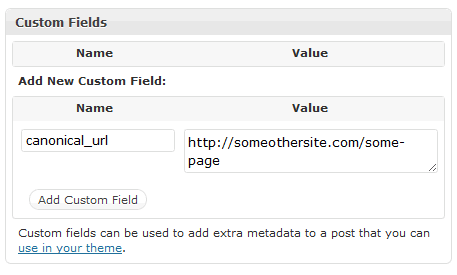
Then, on any post or page on which you want to override the canonical URL, add a custom field with the name “canonical_url” and the full URL value that you want to use:
In the future, there could be a more efficient, “pluggable” way to accomplish this. The current way that WordPress handles this, you could end up with multiple plugins overriding the canonical URL feature, resulting in duplicate or clashing custom functions (as an example, the Simple:Press forum plugin has its own override function). There’s an open ticket on the topic of adding a filter in the rel_canonical function to make this process cleaner. Some of the example code above was taken from a patch in that ticket.
 Facebook
 Twitter
 Email this
 keung.biz. Hire my web consulting services at
  Follow us on Twitter


March 16th, 2012 at 7:56 am
Andy Ogden says:
I found this after deciding that other solutions are far too complicated, this is so simple and I was surprised it doesn’t already exist.
I added your code the the functions.php file within my theme, however after uploading the amended file I got a 500 Internal Server Error. This didn’t go away until I removed your code from the file.
This is exactly what I’m after and would really like to get it working.
Any thoughts on the error?
Thanks
Andy
Reply from Peter: Unfortunately not. I did a syntax check on the pasted code and it returns OK. Likely it’s just a small error when pasting.
January 15th, 2014 at 12:24 pm
mike says:
I added this code today and everything seems to be working great. Thanks Peter!
June 16th, 2014 at 11:48 pm
Yogesh says:
Nice post.
Awesome code functionality.
Thanks
Yogesh
October 29th, 2014 at 3:26 am
pdwalker says:
Simple, easy and clear.
Thanks!