
Version 1.2 beta release and new feature walk-through | Peter's Sports League Standings | Forum
Back to the sports standings script page
 Log In
 Home
Home

 Topic RSS

6:00 pm
 Offline


See the installation instructions in readme.txt or see the main script page as the steps have not changed from version 1.0.
If you are upgrading from a version 1.0 or 1.1 installation:
- Back up your files and database!
- Run the MySQL commands in upgrade_1.x_to_1.y.sql to upgrade the database tables from Version 1.x to 1.y. If you are upgrading across multiple versions, you must run the commands in multiple files. For example, to upgrade from Version 1.0 to 1.2, run the commands in upgrade_1.0_to_1.1.sql, then run the commands in upgrade_1.1_to_1.2.sql.
- All files can be overwritten except for settings.php, unless you have customized the display in standings.php or update.php.
- settings.php has new settings for winning percentage calculations, seasons customization, and admin folder location, so you can copy and paste those sections to your existing settings.php
New feature walk-through
Multiple season support
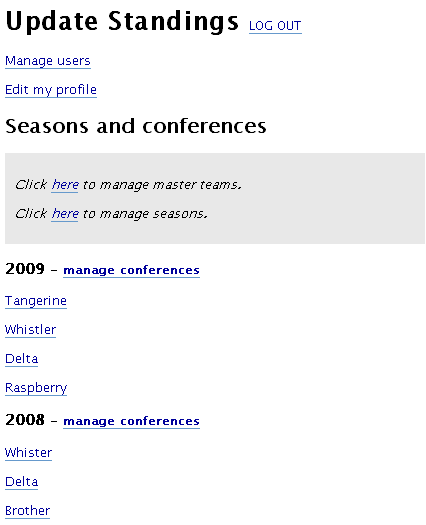
The main admin page now enables you to manage multiple seasons. Structurally, your league must have at least one season, which contains one or more conferences (you can of course change the display file to act as though the seasons feature does not exist).
------------------------------
------------------------------
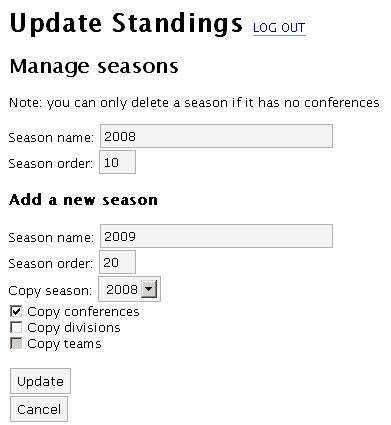
When you create a new season, you can choose to copy the conferences, divisions, and teams from a previous season:
------------------------------
------------------------------
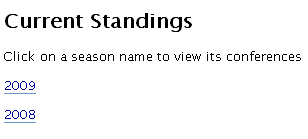
There is a new setting in settings.php that controls whether the main display page should display a list of seasons...
------------------------------
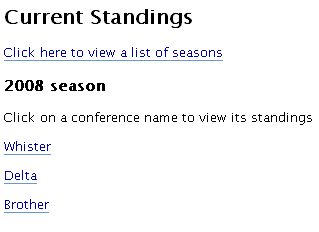
... or the details for a particular season:
------------------------------
------------------------------
// By default, the main page shows the conferences of the default season

// Change this to false for the main page to show a list of seasons

// Or, change this to the ID of a season to show

$show_season = 1;
Master teams: linking teams from multiple seasons
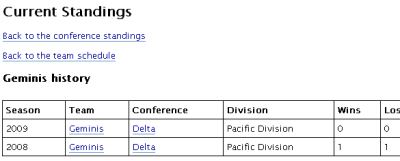
There is a new concept of a "master team". Each team must now have a master team. In a nutshell, the master team is not directly related to any scores and the normal concept of a team remains the same. The usefulness in the master team is to link teams from across multiple seasons to produce a team history:
------------------------------
------------------------------
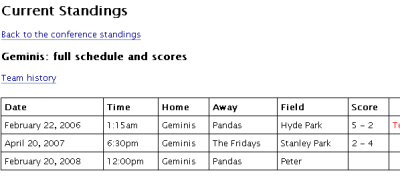
On the public display side, this history page is accessible through the "full scores and schedules" page when you click a team's name:
------------------------------
------------------------------
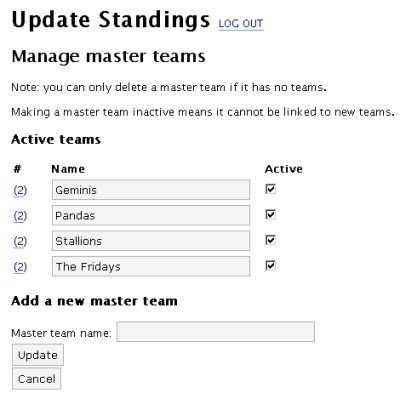
The page to manage master teams on the admin side looks like this:
------------------------------
------------------------------
Admin files folder
This isn't so much a new feature as a new file structure. For efficiency reasons, the code in the admin file update.php has been split into many files contained in an admin_files/ folder. You can change the name of this folder and then configure the appropriate new setting in settings.php:
// The directory under which the administration files are held

$admin_dir = 'admin_files/';
8:59 pm
Offline
Great!!!
I'll give it a test run and start working on some documentation.
2:55 am
Offline
Thanks!
I'm particularly interested in any feedback on how to make the interface easier to navigate and/or more consistent. My big focus has been functionality (which is of course in need of continuous improvement), but I think the admin side of things could definitely be more intuitive.
1:56 pm
Offline
I'd like to see a header file for the admin with links to the different admin functions. For instance, the only way out of the "Manage Master Teams" screen (if you don't make a change) is to click the "Back" button on your browser. There should at least be an "Admin Home" link next to the "Logout" link on the top. I've added menu navigation on both the front and back-end of my league site.
I like the addition of the seasons so far, but wonder if it would be easier to navigate if you chose a conference first and then the season you'd like view. I'd be curious to see what others think about this.
I haven't run across any bugs yet and have been focusing on usability so far.
8:19 am
It's been two weeks and I haven't run across any issues yet. I was hoping to see some feedback on the conference/season layout though.
4:21 pm
Offline
Sorry for the slow reply. I haven't gotten around to even looking at the code since the beta release.
You should be able to hit the "Cancel" button in the "Manage master teams" page but of course if it's not clear enough for users then it's simply not good enough! Therefore, I think I'll look into adding some sort of "cookie crumb" navigation below the header. (Sort of like "Home > Conference > Division")
My strong preference is to leave the "season, then conference" navigation hierarchy the same. In most implementations that I can think of (of course there are variations), people are wanting to look at a specific season / league first, then they can view the conferences, divisions, and teams within it. I would see "conference, then season" navigation only being good for some sort of archive, but not for actively updated seasons.
8:09 pm
The breadcrumb is a great idea and should help a lot with the admin navigation.
The "Season then conference" order has grown on me since my initial post at the beginning of the month. What I did was create separate seasons for each league/conference. You can check out my site here:
