Bypass Brother printers’ colour cartridge requirement for black and white printing
First published on April 8, 2009
It’s bad enough that many printers force you to replace ink cartridges well before they are empty.
Since we purchased the Brother 685CW inkjet printer, we have printed almost exclusively in grayscale or black and white. But when the black cartridge ran out, the printer reported that the yellow, cyan, and magenta cartridges were empty as well. That was hard to believe, and it defeats the purpose of having individual ink cartridges. At any rate, we figured we would replace the black cartridge and abstain from printing in colour.
Sadly, the printer refused to print in black and white until it received new colour cartridges. Well, if that’s the case we should really find a more reasonable printer. It’s an inconvenient and costly situation.
Thankfully, as suggested in someone’s comment on amazon.com, there is a solution that doesn’t involve getting a different printer or unnecessarily buying more ink. After placing a piece of electrical tape over a “window” on each colour cartridge, we were able to “trick” the printer into thinking the cartridges were full.
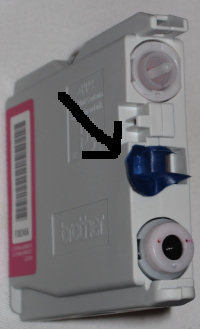
After a bit more searching, I discovered that this is a common issue, especially regarding Brother printers. The reasoning given by printer companies is along the lines of having to continuously flow ink to clean the system. I’ll take my chances, as the potential loss of colour printing isn’t so bad in our case; I’ll also keep hoping for either a smarter, more convenient and economical printing design, or a printing company that isn’t trying to rip us off.
 Facebook
 Twitter
 Email this
 keung.biz. Hire my web consulting services at
  Follow us on Twitter


April 29th, 2009 at 10:25 am
Cassie says:
Regarding inkjet printers…. I don’t print pictures or anything like that with my Canon inkjet printer. I’ve had it for over 4 years, and have used no-name cartridges from Abacus (http://www.private.abacus24-7.com/driver.aspx?topic=compatibility&compat=12644) that cost a couple of bucks each (individual cartdriges), I would not buy another printer that I could not buy generic ink for, I’ve saved hundreds of dollars over the years by doing this. My kids can print full color pages for their school work, I don’t sweat it, and the printer never clogged or streaked because of the ink quality. Printing photos is cheaper and better through Walmart.ca or any other printing service, sometimes 10 cents a copy. Filling cartdriges with kits is a waste of time (only took me wrecking 3 printers to be convinced of this, never again). That’s my 2 cents.
June 16th, 2009 at 3:27 pm
Ferr Dogg says:
You are a lifesaver, I have been wanting to do this for years but thought it was impossible. I have spent so much money on the color inks over the past few years, not anymore!!
June 17th, 2009 at 1:03 pm
ML says:
where would i put the tape on canon pg40 and cl41 cartridges, if at all possible?
Reply from Peter: Sorry, I have no idea how it works with Canon cartridges. However, if someone else does, please post a comment
July 2nd, 2009 at 7:02 am
CodeAddict says:
There are various "chip resetters" on the market for people who don’t have a Brother printer. The device can reprogram the chip on the cartridge to make the printer think it is still 100% full! Just google "<vendor> chip resetter".
I also found a program for Epson printers which could reset the cartridge from Windows: http://www.ssclg.com/epsone.shtml
I haven’t found them yet, but perhaps there are similar programs for other vendors.
July 28th, 2009 at 11:49 am
Jay says:
Hi, i bought a Brother MC-2330 on sale in January and the cyan ran out or at least the printer says so…all i want to do is print grayscale and it still would not let me so i emailed Brother to tell them what i thought of their print policy. They gave me the option of spending another 180 dollars to upgrade to their laser black only!!! Cheez thanks A$$holes. So their next offer was 20% off ink cartridges-but they wanted 50 bucks for the colours-bend over again. Anyway thanks so much for the bypass using the tape as it works great and there is still lots of ink left.
Brother can GFT.
July 31st, 2009 at 8:55 am
mcd says:
I am going to try this trick, if it works God bless you my friend. I am sick of big companies taking advantage of customers, and Brother seems to be only one of them. Let”s rock!!
August 2nd, 2009 at 7:34 am
Nels says:
Hello:
It is NOT clear just eggsackly where to place the tape.
I have tried multiple times – placed tape on ALL cartridges but the cartridge then "jams"
Please, can you be more specific?
Thanks for a very informative article – I”m sure SO many folks appreciate it.
September 6th, 2009 at 4:27 pm
cmh says:
Thanks so much! This was driving me crazy.
Nels, the first time I tried it the cartridge tried to jam, but just give it a firm push and it’ll snap back into place. I think the electrical tape is key, as that has elasticity to it.
January 12th, 2010 at 2:24 pm
John says:
It definitely works. Thanks for the tip!
February 11th, 2010 at 1:32 pm
phanny says:
I have Brother that uses LC65 and LC61 cartridges and I was able to use gray duck tape because I didn’t have electrical tape. I did it the first time and it didn’t work because I think I put the tape on too tight, but after loosening the tape so the tape can be flexible to form the shape it needed to when pushed inside the printer it worked. This should save us some money. For now =).
February 19th, 2010 at 5:56 pm
i drummond says:
brother mfc 235c tape works perfectly. previously i had epsons and resetters worked perfectly for them. regarding refilling – can mix your own colours to refill for interesting effects. thanks for site
March 6th, 2010 at 3:03 am
JohnP says:
If you are thinking of another printer don’t go upmarket to an HPC6380 or a similar "new" design. As yet there are no chip resetters available. Another problem with the named printer (and possibly others) is that it must be turned off with the console On/Off switch. Turn it off at the wall and you can damage the printer. Mine came with a faulty power supply so that even though I had read the manual and been warned, guess what. That is something they don’t tell you before you buy. Even a house power failure would do it.
March 14th, 2010 at 11:07 am
MATT says:
I just did it with black electrical tape and the LC 61 color cartridges. Thanks, does this mean I owe you $$$ now??? Boo greedy companies, Hooray! you!
April 7th, 2010 at 4:27 pm
Dom says:
Peter,
You are the man. Your blog was the first Google result for "force brother printer to print" and for good reason. My mother needed to print her boarding pass tonight, after the local stores had closed, and this blog was our saving grace. Needless to say, covering the ENTIRE opening around the ink window worked perfectly. Thank you so much! Screw Brother!
April 14th, 2010 at 4:23 am
Jack says:
You are right. It works. Now my Yellow, Magenta and Cyan are full!!!
I have a Brother DCP-145C. First it didn’t work but after applying the black tape on the inside of the space were the little plastic square tube is placed, it did.
Jack
The Netherlands
June 13th, 2010 at 8:31 pm
Jessica says:
We just solved the problem by coloring the window with a black permanent marker (no electric tape). Worked like a charm!
June 21st, 2010 at 11:18 am
Brian says:
You Rock! Thanks for the tip. Jessica’s black marker idea sounds good too. Thanks again.
July 13th, 2010 at 2:09 pm
Lisa says:
WOW! THANK you x 1,000,000! It worked!
July 24th, 2010 at 1:50 am
Josh says:
Thanks Peter you are a life saver, my borhter printer mfc 5890 had run down my color print cartridges even though i had only ever printed in greyscale from new, and then refused to work until i replaced the both the colour and black cartridge.
what a scam by the printer manufacturer to force me to buy ink i never used.
I took your advice and used a little piece of black tape and placed it over the window on the cartridge, this tricked the printer into thinking the colour cartride was full and i was able to continue printing in black only.
happy days.
thanks again.
July 28th, 2010 at 6:01 am
Kim says:
you are brilliant you are going to save millions of people money not to mention little old me. Thank you
August 19th, 2010 at 4:14 pm
wallcat says:
oh thank gods, you just saved my butt! thank you so much!
September 1st, 2010 at 6:38 pm
Nikko says:
in 410 CN printers its ink cartridge LC47C is different from that yours but i tried to put a very small cotton ball on the white stick below the cartridge and it worked…did you change black?? yes…. cleaning please wait… then I can continue up to the last drop
September 13th, 2010 at 4:19 pm
Regogal says:
This worked like a charm…I used a piece of black construction paper over the window, and taped it down on the sides…got my urgent doc out, and now have time to get my yellow replaced.
Thanks!
October 17th, 2010 at 7:05 pm
jean0 says:
very grateful!!! thanks so much, worked great!
November 17th, 2010 at 9:24 am
Weezer says:
We have a HP officejet Pro 8500. I have worked at alot of places with different prints and this one su—s. But I am stuck with it at this office. 4th replacement. Now this ink thing–same thing I don’t use color at all and it is eating ink–just replaced the color ones 2 wks ago and there almost gone. Does the trick with the tape have to be electrical?? Also do I put it in the middle?? There is like an eyeball on the bottom and just a blank slot on top and another blank hole in the middle-the photo shows the middle, so I did this but jused scotch tape, all I had–will this be ok?
Reply from Peter: It doesn’t have to be electrical, but I had chosen electrical because it’s dark and sturdy. As for whether it works for other printers, I don’t know; you’ll just have to try!
December 19th, 2010 at 9:26 am
Amanda says:
I just used this trick on my brother printer and it worked!!!! Thank you!!! I was sooo angry at my printer for not printing in black ink just because the colors were empty. The black was still over 1/2 full. I placed black electrical tape over the windows just as described and voila! it worked. Thank you for this money saving tip
December 28th, 2010 at 9:03 pm
Adam says:
awesome. thanks. unimpressed with Brother Marketing at the moment, this is a blatant and undeserved money grab.
otherwise, machine works great, but there’s no room for this.
January 15th, 2011 at 10:13 pm
Sue says:
brilliant..this trick works awsum
January 23rd, 2011 at 6:23 am
Ant says:
Absolutely brilliant tip – took me a couple of goes as my tape was too large, but now works perfectly Thanks
January 26th, 2011 at 1:04 pm
batgioi says:
So cool that I used a permanent marker instead of the tape and it worked. Maybe have to blow the ink tip and make sure it dry.
February 18th, 2011 at 11:39 am
Kevin says:
Thank you so much for this tip; I can now at least print stuff in black/greyscale until I get new cartridges.
March 7th, 2011 at 6:32 am
Abby says:
THANKYOUUUUUUUUUUUUUUUUUUUUUUUUU! i couldnt quite figure out the tape bit but jessicas black marker idea just saved my butt big time, but if it wasnt for your original post i would be getting a major fail in my essay tomorrrrow !! THANKYOUUUUUUUUUUUUUUUUUUUUU
April 3rd, 2011 at 12:57 am
Bach says:
Excellent tip!!!
After all that money wasted on colour cartridges, when I’ve never ever printed in colour anyway. Rip offs!
Jessica’s idea, sound better though and less risky,
just in case the tape gets stuck in there or something.
Thanks
June 17th, 2011 at 11:04 pm
J says:
Just wish to say how much I appreciate you post!
I have been stuck with this after getting a Brother DCP.
thank you for sharing!
-J-
June 18th, 2011 at 2:11 pm
stef says:
yup, worked for my dcp 357 c.
saves allot of money!
June 30th, 2011 at 8:49 pm
sr says:
Thanks so much! It worked like a charm! I’m buying only laser from now on.
If it helps anyone, I didn’t have any electrical tape around but I had some black plastic from the top of a hot sauce bottle and I cut it and loosely put it around the window. I bet you could use a piece of garbage bag or even colored paper or anything you have around the house. Don’t get screwed by this printer refusing to print your homework or project at 2 in the morning. Find anything to cover that window. I bet aluminum foil would work or pretty much any opaque thing.
July 29th, 2011 at 4:50 am
Wendy says:
Thank you for this great tip! I used a piece of a garbage bag and it worked like a charm!
July 30th, 2011 at 12:10 pm
Rinoa says:
Thank you SO much for this ingenius tip! I used a bit of dark paper and some ordinary tape, and voila – I was able to print out the boarding pass I so desperately needed. You saved me a £40 "fine" lol:) I’m truly grateful!
August 12th, 2011 at 7:49 pm
DC77 says:
I LOVE YOU. Than you thank you thank you!!! Never again do I have to succumb to Brother’s capitalist demands…………. all it took was some masking tape!!
August 21st, 2011 at 5:21 pm
mlwlpt says:
Thank you sooooo much! It worked. My last Brother printer let me print in just black. I save color for special occasions, if ever.
August 30th, 2011 at 9:50 pm
Daniel Ashford says:
This is the best blog ever!!! Showed me exactly how to place the tape with that awesome photo!
Got my mum’s printer going again so i can print out some docs for a job application! AWESOME! you’re the best!
Brother are money hungry dogs!!! I always told ppl that Brother were good value for money, but I wont be saying that again!
October 16th, 2011 at 10:20 am
Michael says:
Thanks Peter ….much appreciated…worked perfectly!!!
October 27th, 2011 at 8:08 am
Hugo Reis says:
Great, great, great! It worked for me. Brother will never see my money again.
Thanks, thanks, thanks!
October 27th, 2011 at 12:45 pm
bingbob says:
Did this on LC1240Y cartridge for MFC-J6710DW. Just covered the transparent little window nestling in the middle of one end of the cart. A single piece of tape nicely wraps round going under a little black bar to cover both sides of the window. Worked immediately. No messing about.
November 5th, 2011 at 12:52 am
Birch says:
Did not work for me with electrical tape, it told me I had tried to replace the cartridge with a black cartridge (it was my cyan that was out of ink) .. so, I cut a piece of the cyan coloured sticker from the existing ‘empty’ cartridge and wrapped THAT around the window, and it worked YAY!!!
December 20th, 2011 at 9:39 pm
Mike says:
OMG! Thank you so much! These people from Brother company have made me spend so much of money on ink cartridges, which I have hardly used. The ink would somewhat dry up and the printer would not print, asking me to replace the ink.
I put just a bit of electrical tape and it has worked just great (black and white or grayscale printing). THANKS again.
BTW: I have a MFC 65cw
Hopefully all Brother customers can get access to this info easily. Infact if there is Brother sucks.com or if better business bureau can report this, will be even better.
January 27th, 2012 at 1:24 pm
john says:
Yeah, not impressed with brother at the moment for this POS money grabbing tactic.. trick works great. Didnt have electric tape but blue painters tape worked wonders.
Thanks man.. great tip. Im all for capitalism but F*@# the man on this one.
February 23rd, 2012 at 12:13 am
Mdub says:
thank you soooooo much. mfc-5890cn putting ducttape in between guard and window to cover the window itself was awesome. left a little slack and pushed in snugly. great idea….. MFC-5890CN
February 25th, 2012 at 4:47 pm
Erik From Germany says:
WOW, such a neat Trick. I looked all over the house for some electric Tape. Until my son said "hay DAD" just use a Black Sharpy Pin and color in the clear window. I have a brothers MFC 290 C and it worked just as well. Thanks again for the clever Idea. Just saved me $50. Bucks :-() YAAAA Thats a BIG bottle of Jager Meister Tonight.
March 19th, 2012 at 7:10 pm
Gary says:
I have problems with my Brother printer not printing black, even though full.
After talking to a teckie was told Brother has a counter on the main board and there is no way to reset it!
Aparently a few companies are doing this but don’t admit to this
April 1st, 2012 at 6:37 pm
Ralph says:
Worked perfectly. Thanks for saving me hard earned cash!
May 14th, 2012 at 3:09 am
emergancy print job says:
YOU WHO EVER YOU ARE, ARE THE FRICKKENNNS BEST!!! I spent 4 hours in the black of night trying to figure out why my new printer with a brand new full black ink wouldnt work. hummm it was because they want to force me to buy all four colors. they suck you are awsome!
May 31st, 2012 at 9:17 am
christine says:
thank you so much, the trick worked perfectly lol
on my cartridge i had to make the piece of tape very small to cover the hidden window but finally it worked, you rock
June 7th, 2012 at 4:52 pm
Desiray says:
Worked perfect! You saved my printers life. It was about to jump out of a window.
July 12th, 2012 at 11:35 pm
benem3000 says:
I just gave the cartridges a really good shake (and a couple hits and throws out of anger) until the ink in the window got all bubbly and it worked. Doesnt measure at 100% but i really needed to print something and this saved me from having to go to the store.
July 15th, 2012 at 11:23 am
La says:
Amazing! Thank you so much.
July 19th, 2012 at 11:38 am
Rebeccaf612 says:
AWESOME!!! Years after your original post with the tape idea it is still working even on newer printers! This saved me today and put the biggest smile on my face! Now I can print my shipping label and get this order out without going to the store to buy those darn color cartidges. Thank you…………you should set up a donation account through PayPal. I would donate to you just for this advice.
July 29th, 2012 at 10:53 am
ea1002 says:
Works like a charm!! you should hide only the part of the ink detection leaving the space there free, otherwise the printer won’t recognize the ink.
i tried this on brother mfc-j430w and it works great!
August 16th, 2012 at 9:19 pm
Miss M says:
Man, I love the net! ……Normal sticky tape coloured with a black permanent marker has worked for me. I never even knew this problem existed until now….wonder how many times I have been ripped off by re-filling or changing ink cartdridges unnecessarily??? Not any more. Thanks guys : )
August 20th, 2012 at 5:30 pm
stephanie says:
I don’t seem to have the tab on my MFC 210C where you are putting the tape, it’s just a bar that runs from one hole to the other?…I really need to do this too because I never use color, it’s just NOT that important! thanks
August 20th, 2012 at 6:04 pm
stephanie says:
I just covered all the color middles of the cartridges, got ink all over my hands and it still says I got no ink!…gggrrrrrrr!!!!!
September 30th, 2012 at 5:53 am
Dee says:
This tip has saved me $$ and a 100 mile trip on a Sunday. It worked. A piece of black eletrical tape just over the window itself worked like a charm and I am printing. I have struggled with this for 6 months. Tried grayscale print with just yellow & black. That worked for a while but still got the annoying pop up to replace ink every time I printed. Then on a Sunday critical print needed & refused to print without more Cyan & Magenta. They have actually been empty for a while so don’t know why today….except the printers ability to sense how badly you need something LOL. Anyway….thanks !!!
October 21st, 2012 at 6:10 pm
Lena says:
That was awesome!! it worked like a charm. Ive been struggling for months with my printer trying to make it print from the black cartridge only when the other colors were empty…whew…now I dont have to fork out the extra dough to buy the other 3 cartridges…thanks soo much!
October 30th, 2012 at 9:22 am
Sue B. says:
This tip just helped me out big time! Thank you.
December 15th, 2012 at 9:13 am
Charles Farence says:
This worked perfectly! I could see the ink in the cartridges when i flipped them around but the printer always would say its empty. Though I do use a laser printer for my Black & Printing needs. (My Color Laser has a line streaking problem) I mainly use this for a couple of copies and scans.
January 17th, 2013 at 10:44 am
Anna says:
Thank you for this information! I can’t tell you how much I did not want to buy new colored cartridges when they were still half full in order to make my printer work. TY
January 27th, 2013 at 9:06 am
Rich says:
Anything opaque will work. I ended up using "white out" Worked great.
January 28th, 2013 at 4:59 pm
Danny says:
I’ve just bought a MFC-J280w Brother printer. If I knew that these scammers use this tactic, I wouldn’t have bought it, but now the return deadline is over. I’m trying to find the place where I’m supposed to place the electric tape, but I’m not sure about it. The format differs significantly from the picture on the top of this page. The cartridge model is LC71 followed by the colour letter. Can someone help me?
Also, I may even give this printer out and buy another one, if the trick doesn’t work. Can someone tell me which brand is the most honest, or the least crooked regarding cartridges? I’ve NEVER used any colour, just black. Why should I spend money in colour cartridges?
Furthermore, can someone tell me if there would be any legal implications for me if I break my brand new Brother printer with a sledgehammer while someone makes a video, and then post it on Youtube along with a narration like "this is is my brand new Brother printer and I am breaking it because I refuse to be robbed? By the way, I live in Canada, so I would appreciate if you only give your opinion if your familiar with Canadian law regarding this subjetc.
Thanks for any help.
January 31st, 2013 at 11:20 am
Nicole says:
Totally worked and totally saved my life!!! I had some very important things to fax over to a company and the tape thing did the trick. THANK YOU!
February 24th, 2013 at 11:21 am
Rob says:
Excellent advice. Though I used a darker form of sellotape and covered the small ink window with about three layers of the stuff. Works a treat!
March 3rd, 2013 at 3:52 pm
Jackie says:
Beautiful. I was quickly going stark raving mad trying to get my Brother print to print in black only. Upon covering the eye with a little duct tape, my printer is off and running printing in black ink only. Many thanks for the excellent advice which has saved my sanity!!!
April 1st, 2013 at 4:42 pm
charlene says:
That you so much for this trick. It worked and I don’t have to buy all those colored cartridges. I had a full black but it wouldn’t print, did your trick and it printed. Thanks again…clever
April 28th, 2013 at 5:10 pm
Ren says:
Just did this on my Brother MFC-J430W. I just bought a new black cartridge (which really was empty) and I put it in… and then my magenta was too low to print! I took my tan duct tape, colored it with a sharpie, then put it on the "ink window". Printer asked if I installed a new magenta, I pressed "yes", and now it says it’s completely full. Thank you so much! Worked like a charm. I almost never use color so this was perfect.
September 9th, 2013 at 6:35 pm
Sim says:
Does anyone from the beginning of this trick had problem printing color after weeks, months or years of "electric tape" on?
I’ve tried, it works as you all, but what if I want to print color in 6 months?
Having 3 kids at school it sure will happen…
Thanks in advance
And thank for the trick!
September 10th, 2013 at 2:35 am
Margaret says:
You, my friend, are a genius! I used green painters tape over the clear window of the offending empty yellow cartridge in my MFC-J430W – and the stupid machine is completely fooled!!! Black and white printing now back in operation! Thank you, and thank Google for leading me to you!
October 22nd, 2013 at 2:31 pm
Mike says:
Thanks a million! I tried to colour it with a black Sharpie but to no avail. The piece of electrical tape worked like a charm!
November 5th, 2013 at 9:15 pm
Robert Holmes says:
So fed up of getting ripped off by the crooked printer companies. This worked great, thanks a million!
December 15th, 2013 at 11:22 am
Bigfoot says:
for those of you who don’t know exactly where to put the tape. here is a little clear plastic window in between the two holes top and bottom. you must cover up that clear plastic because that is what indicates the level.
March 16th, 2014 at 1:28 am
Lizzie says:
SUPA thank you for the advice, it worked out great. Thanks to people like you we can fool companies as Brother just as they fool us.
April 6th, 2014 at 1:41 pm
Will van Diepen says:
Also from the Netherlands thank’s for the advice. I had the same problem whit my Brother J6510DW. I did figure out where to place the tape. And yes I can print again whit only a black cartridge. After so many years this page is still important.
Thank’s again
May 15th, 2014 at 2:59 am
techagile says:
worked but will monitor for few days. thanks for the post.
cheers.
May 19th, 2014 at 3:55 pm
mpeace38 says:
This problem has frustrated me for years. I barely use my printer, and usually only black and white When you look at ink seems to have a lot left. Thanks to your hint I painted the window black and it works great. You saved me a ton of $$
May 26th, 2014 at 7:23 am
DEATH2brother! says:
You ROCK petah! its alive its aliveee its ALLLLLIIIVEEEEEE ahhh hahahahahahahaha!!!!
Greedy corps should spend more time I N N O V A T I N G instead of devising antifeatures! ROTTEN mofos!
June 27th, 2014 at 12:21 pm
Bob says:
Thank you! Worked perfectly!
July 12th, 2014 at 8:03 am
hendri says:
need problem solve.
i have problem with my brother MFC J6710DW:
printer not detect for ink magenta cartridges..
i have trying to open all cartridges and install again but not working.
display still ink magenta not detect, please install ink magenta cartridge.
July 16th, 2014 at 1:10 am
Sharon says:
Thank you, thank you, thank you!! Work from home, trying to get a vital bit of info in under time restraints and this just saved my bacon!!! Thanks again!!
July 21st, 2014 at 9:38 pm
jen says:
need problem solve
brother mfc-j430w yellow ink cartridge cannot detected
i put electric tape, i install again but still not detected -_-
August 12th, 2014 at 6:36 am
D.Y. says:
Works perfectly on Brother J6510DW!
Thanks a lot for this great tip!
October 4th, 2014 at 3:22 am
Nicole says:
Genius! Did it with Duct tape and it worked perfectly!!!!
December 4th, 2014 at 6:01 am
Frank says:
Brilliant!
I used green masking tape and it worked wonderfully. I have a bother MFC-j430w
December 7th, 2014 at 3:20 pm
Dorothy says:
The black electrical tape worked like a charm. Wow! Thanks for such an EASY way to address such a frustrating (and expensive) problem! You Rock!
December 8th, 2014 at 12:13 pm
Diana says:
Thank you, thank you, thank you. I needed to fax an invoice so I could get paid this month. I bought black ink, but my Brother LC61 printer/fax still wouldn’t print. It said I needed colored ink to print a black and white invoice. This trick saved the day. I just pulled up a small piece of the label off of the ink cartridge, cut it and put corresponding color on cartridge. I am so happy right now *happy dance*
December 10th, 2014 at 9:23 am
Lana says:
Life saver! Thank you! XD
December 10th, 2014 at 11:36 am
Johnny says:
Kudos to the original poster. I spent an hour with a black marker and it didn’t work. I covered every piece of clear plastic on the cartridge and still did not work. So I googled for an answer and here I am. Tried electrical tape and it worked perfectly! Maybe because it is a newer printer and Brother is wise to the black marker fix. It appears my printer is more sensitive to shades, so the tape did the trick. Many thanks…
December 10th, 2014 at 11:48 am
AL says:
AWEOME!! Brother LC61. Worked.
December 26th, 2014 at 8:13 pm
Dan says:
Thank you! It works on my Brother MFC-J835DW printer.
December 30th, 2014 at 9:18 pm
Liz says:
I was about to turf this thing out the window, ridiculous that you need colour cartridges to be full to print in B&W. THANK You! and yes, I would donate a couple of $$ to you for this save! Even years later!!
January 21st, 2015 at 4:43 am
matt says:
this worked for me originally by just reinserting the non oem brother cartridges I had and saying that it was as new cartridge. worked fine but ive only used black printing for years.
now when I finally ordered more color cartridges it will not print in color at all
so I guess by doing this it will mess up the print heads for the color ink permanently so that it will never print in color again
the better solutiuon I think is just to order non oem ink from ebay you can get 20 packs for only about 12 dollars that comes with 8 black, 4 of each other color, without damaging the print heads for good
February 5th, 2015 at 7:02 pm
Shane says:
Worked for me too! Brother MFC-J5910DW. Yellow was empty and I needed to print only in black and white. I cut a small piece electrical tape and placed this over the window and installed the empty cartridge. Printer asked if I just changed the yellow and I said yes. Printer started printing!
February 9th, 2015 at 2:49 pm
Jo says:
Thank you!!! SUPER helpful!
February 10th, 2015 at 9:19 pm
JT says:
Seems like nothing more than a cash grab when a person can’t print a black/white document because they’re out of yellow ink, even though the black in is new and full! Too bad I didn’t know about this BEFORE I purchased my printer and/or before I ran out of yellow ink and didn’t think much of it.
Thanks for the awesome tip…worked like a charm and happily printing my documents.
February 14th, 2015 at 9:11 am
Darren says:
This worked for me on a Brother MFC-J6510DW
I used liquid paper over the top, bottom and front window and showed full right after.
I needed to print a legal document on a Saturday night so there was no going out to buy ink.
I’m putting tags here so my fellow Brother Printer users can google and find this post:
Brother MFCJ610DW MFC-J6510DW Cannot Won’t Print Black and & White Without No Color Colour Cartiridge Ink Solved Solution How To Make Do
March 12th, 2015 at 10:12 am
Zen says:
Anyone have a suggestion for getting the the BLACK cartridge (MFC-J430W) to work? The cartridge is full – recently refilled again, no air locks or bubbles, we run "clean heads" numerous times and it keeps saying "Cannot Detect" black cartridge :/
Super frustrating. We’ve had this model for about 2 years using an ink refill kit with NO problems, then suddenly it won’t work. Worse yet is we can’t get it to print using the color cartridges it can detect that are full.
Please someone HELP…….
March 18th, 2015 at 7:37 pm
Courtney says:
Thank YOU for this tip! It totally worked on my Brother MFC-J430W– and granted relief for my huge frustration over not being able to print boarding passes, even with a FULL, XL black ink cartridge. You’re awesome for sharing!
March 24th, 2015 at 8:01 am
bas says:
I didn’t have black electrical tape, so i used a inner tire repair kit from my bicycle.
I put the little adhesive rubber sheet over the opening and my brother is fixed.
brother dcp-357c
March 26th, 2015 at 2:25 pm
Cosmo says:
WHOOP! Thank you sooo much!! Brother MFC J430W printer, I used black electrical tape cut really small and used tweezers to put it over the clear windows…. I may have inky hands but I have a fuller wallet now that I don’t have to purchase new cartidges yet….
Thank you!!
April 3rd, 2015 at 7:17 am
ronni clark says:
This is not working with the tape on this brother mfc210c
April 16th, 2015 at 5:54 am
Susan says:
I just tried this with my Brother LC61 cartridge. I was SO MAD when I tried to print a greyscale document, only to have the printer tell me I couldn’t print because I was out of yellow ink. So annoying. Tried the marker, it didn’t work, but the electrical tape worked like a charm. It took FOREVER to go through the cleaning cycle, but then it printed everything I needed.
THANK YOU.
April 25th, 2015 at 8:42 am
Lochlann Kilburn says:
Thank you sooooo much, i just bought color cartridges and used them two times and it said i was out of magenta. this definitely worked!
April 26th, 2015 at 12:01 pm
Laurie says:
Echoing thanks like those posters above! I have the Brother MFC-J435W printer; changed out the black, and one by one, the printer stated each color was low and needed replacement. NO WAY! This worked like a charm (with black electrical tape.) It irks me that this company builds a product with this purposeful defect. When it dies, no more Brother printers in this house!
May 9th, 2015 at 11:49 am
mirjam says:
Wow! Thanks for the tip! It works with ductape too! I am very happy now
June 4th, 2015 at 4:53 pm
Tony says:
Well done. I found a little window on my Brother printer and got another few thousand pages out of it.
Cartridges were still at least half full.
June 9th, 2015 at 5:00 pm
Giselle says:
Well as of June 9, 2015 this works on the Brother LC75/LC71 that was about to be tossed out the window in frustration.
Thanks a million everyone.
My fix worked with masking tape & sharpie! couldn’t find the dang electrical tape!
Now I know why I should have stuck with Canon, never had this problem before now.
June 15th, 2015 at 4:10 pm
Fernando Von Arb says:
Very nice tip; thank you very much. LC75 cartridges were infuriating. Take that, Brother!
I’ll probably buy a toner printer next time.
July 4th, 2015 at 8:29 am
Mat says:
Holy crap !
This is working with Brother j4510dw’s Cartridges
thanks a lot
July 16th, 2015 at 6:44 pm
TDK1 says:
Worked on LC-101M/LC101M and it should work on the LC103/LC101 of any color! Tried tape ONLY over the transparent window. Covering too far in front will cause the printer to say "Cannot Detect."
August 17th, 2015 at 10:37 pm
Bill Walker says:
No need for tape just spray the side near the window with black pressure pac paint. Bingo it was fooled
August 29th, 2015 at 9:39 am
Syl says:
This worked on my printer Brother MFC-J6510DW, the first time I had a problem with printing when my original Brother colour inks ran out but since inserting some replacement premium cartridges I bought online I am getting an error message with my yellow one stating cannot detect – reinstall slowly, then below this – open the ink cartridge cover, remove the cover, followed by press down the ink release lever. Remove ink cartridge. Insert ink cartridge in correct position. Push cartridge until it clicks. Unpack ink cartridge and turn the knob.
After doing all this, I still get the error message cannot detect, despite the fact that the cartridges are full, I have tried using black electrical tape, then a black permanent marker on the windows, and white correction fluid but none of these have provided a solution to the problem?
Just about to give up and buy a new one but the features on the printer, ie A3, Duplex, ability to scan to USB, MS & SD cards in addition to the usual scan, fax, copier facilities is really good!!!
Would apprieciate any further advice/suggestions please.
Thanks
Syl
September 1st, 2015 at 9:12 pm
Alon says:
Thanks
It works with my LC985 cartridge
and save my day
Alon
October 1st, 2015 at 4:24 pm
Joanne Hill says:
Thank you, you Brilliant and Amazing person. Thank you for sharing.
Was able to print out docs without the yellow colour.
Thank you, thank you, thank you.
It works with the LC73 cartridges
October 3rd, 2015 at 3:52 pm
Bernie says:
Me too Syl, nothing is working to get the printer to detect my refilled copy cartridge and I need to print now!! This has worked before but not this time. Help!
October 28th, 2015 at 5:51 pm
Bart says:
Thank you for this tip to cover the little window on the cartridge. I have the brother mfc-j835dw and was extremely frustrated with not being able to print black that I almost office spaced it. I googled the issue and found this thread. I tried black tape and black perm marker and it didn’t work. Someone mentioned matching the color of the cartridge, luckily I had a pack of different colors of electrical tape I needed Y C M. I covered the little window by matching its color and the printer now sees them as being full. Thank You very much.
November 3rd, 2015 at 3:32 pm
fran says:
I covered the color cartridges and it worked. My brother printed in black. Thank you so much for the ingenuous idea.
November 8th, 2015 at 11:46 am
HH says:
I cannot figure out how to do the trick for my LC71 cartridges! I have been frustrated about this problem for months and am refusing to buy new ink when it just gets completely wasted. I tried coloring in a little window-looking piece with my black sharpie but when it said "did you change yellow?" I clicked yes.. and it said "cannot detect" . I’m not sure what else I can cover/color/etc. Any help?? Danny who posted Jan 2013 mentioned LC71 cartridges and "fixing" them. Anyone else have a tip?
November 25th, 2015 at 12:45 am
Annie-Claude says:
I f****** love you!! I was about to cry when I could not print my essay at 2:45 am. THANK YOU, THANK YOU, THANK YOU!!!
November 25th, 2015 at 12:47 am
Annie-Claude says:
BTW, I used post-its since I don’t have electrical tape. I guess whatever not transparent will work just fine.
November 27th, 2015 at 12:53 pm
Lynne says:
Can anyone reply about whether this electrical tape method results in permanently disabling your printer from ever printing in colour again? Any replies appreciated.
November 30th, 2015 at 12:18 am
tanya says:
I use a mfc j6520dw up until now I was able to use the calidad cartridges as a cheaper option to the originals. Same as Syl my printer gives the ‘error message with my yellow one stating cannot detect – reinstall slowly, then below this – open the ink cartridge cover, remove the cover, followed by press down the ink release lever. Remove ink cartridge. Insert ink cartridge in correct position. Push cartridge until it clicks. Unpack ink cartridge and turn the knob. Calidad cartidges have a clear side and a black side.
my cartridges are full . all other cartridges are calidad and are being detected but the yellow
any advice???
December 14th, 2015 at 10:18 am
Greg says:
Brother MFC-J430W – PROBLEMS – I took your advice, I taped up the black ink when it was low and it continued to print for over two more weeks in a business setting. Eventually the printer quality began to show so I replaced the black ink and the quality continued to fade. Now I cannot get any black ink to print. By running the ink too low, did I damage the printer? I have looked into the issue, I cleaned the heads multiple times, tried running printer diagnostics and still no results. Any new advice?
January 3rd, 2016 at 12:14 am
Willy says:
why bother placing tape on the cartridges , In Canada you can buy compatible ink cartridges for about $3-4 per cartridge from 123 ink…… For that price I not taking chances
of plunging the print head or lines from not using color….. as far as I know the ship to the USA and with the differance in the dollar you be getting one H of a deal
January 3rd, 2016 at 5:16 am
Aaron says:
Hello, how do i do it for my brother dcp-135c printer? i want to know which hole i need to tape
January 5th, 2016 at 9:07 pm
Daniel says:
Thanks for the tip! I didnt have any tape on me so i just coloured the window in with a pen and it worked great.
February 9th, 2016 at 1:26 pm
Meg in Massachusetts says:
I have MFCJ870DW and the Brother ink: LC103BK ran out within 24hrs after <60 pp, not close to the "page yield up to 600" as advertised. I took out cartridge, shook it, and it worked fine for ~150 more pages. Still not near 600pp.
But then the Cyan was out and as so many found out – I could print nothing, even grayscale. So thanks for sharing all your experiences – I tried black ink, black tape but no luck. Then, thanks to "BIRCH" I gave it one more try with "cyan" colored cover. I found I had some Post-It Colored Tape Flags with Cyan, Magenta and Yellow!! woohoo. It took 2 cyan flags (just colored part) and some real, clear tape (the post-its don’t stick well enough) and it worked. I found you don’t need to even make it fit directly on the window, so long as it covers the view. Excellent!!!
btw – I did write to Brother to c/o and they wrote back with an entirely lame response.
Thanks all for sharing.
February 10th, 2016 at 5:13 pm
Sarah says:
BRILLIANT! Thank you so much- I was in a time crunch and had no idea that this would TOTALLY stop printing without replacing the yellow ink. Used painters tape because it was all I had. Worked like a charm. THANK YOU!!!!!!
February 22nd, 2016 at 12:07 pm
Paola says:
Thank you so much!!! This ink cartridges problem never bothered me much… until I had to print boarding passes (leaving in the morning the next day) and shops were closed. You literally saved me a lot of trouble, thank you thank you thank you!
March 2nd, 2016 at 11:35 pm
Gary says:
Worked for me on a MFC-J470DW. I had tried this once before but couldn’t get it to recognize that I had inserted the cartridge. This time around, I cut the tape just big enough to cover the clear windows only (not the gap) and it showed my empty yellow cartridge as full immediately! Last time around, I tried just wrapping a piece of tap around the cartridge I think. I don’t intend to run it this way for long for fear of clogging the jets with dried out ink, but it got the print job done. Thanks!!!
April 1st, 2016 at 8:34 am
betty holbrook says:
the mechanism inside the computer which the cartridge door connects to detect cartridges is out of place or broken and my printer Brother MFC-6490CW won’t detect the cartridges so I can close the door and print
April 14th, 2016 at 11:47 pm
Hannah says:
Thank you SO much. You are a life-safer. Worked on Brother LC73.
April 24th, 2016 at 11:52 am
Raimo Lonka says:
Thank you very much for the tip. You certainly saved my nerves. My blood pressure runs high always when (silly) machines takes the control…Worked perfectly on my Brother DCP-J4120DW.
May 2nd, 2016 at 4:05 pm
Raimond says:
Thank you very much for your great help. You saved my life! It worked for me flawlessly.
May 6th, 2016 at 2:24 pm
Prospecial.1 says:
WOW….what a fantastic tip. MY problem was different from ALL the others mentioned here, but was solved with the black tape hack. I have a Brother black & color FAX Machine # SUPER G3 Model 1860 C. same four cartridge problem as printers. After calling BROTHER for help and receiving a large ration of B.S. their tecky said …" the machine has to MIX all four colors together in order to get the right texture black to print, and won’t print without all the colors, including the black cartridge installed full….. it can’t be set to print black any other way." My reply was " Horse Shit , nothing has to be "mixed" with BLACK, to get BLACK. . I told him he probably thwant me to believe that I have to mix 4 colors to get WHITE too. Idiot ! Brother is just money grabbing. Next machine I buy will be a BLACK Lazer printing unit. Brother can KMA.
June 11th, 2016 at 5:16 am
Georges says:
Many thanks it worked perfectly on my Brother Printer MFC-J650 DW. Be careful to cut the black electric tape to fit exactly the window, otherwise, the printer will asking you to replace the cartridge. Also note that the trick mentioned earlier about the "black marker" did not work. Many thanks again.
July 5th, 2016 at 5:44 am
Andrew says:
I didn’t have electrical tape but thick tape from a medical kit worked very well. Thanks to this great tip my Brother printer didn’t go out on the lawn today, and I was able to print a return authorization slip without making a special trip to the office. It’s really annoying that this printer is constantly demanding expensive color ink when I never use it to print anything in color.
July 12th, 2016 at 7:26 pm
Jan Parks says:
AWESOME!!!!!!! Electrical tape worked on my 5 year old MFC-J430 (black marker did not). Thank you so much – I did not want to replace this printer when all it needed was ink.
July 18th, 2016 at 1:16 am
Staycee Dee says:
THANKS!! At first I couldn’t get it to work and I still kept receiving a message that the cartridge was not being detected (and the black marker tip didn’t work at all either). But then, this message below helped me over the hurdle:
Gary says:
Worked for me on a MFC-J470DW. I had tried this once before but couldn’t get it to recognize that I had inserted the cartridge. This time around, I cut the tape just big enough to cover the clear windows only (not the gap) and it showed my empty yellow cartridge as full immediately! Last time around, I tried just wrapping a piece of tap around the cartridge I think.
Thanks Peter and Gary! I got my document printed and will use this method until I receive my replacement cartridges.
July 24th, 2016 at 4:28 am
kay says:
WaW! excellent tip. Where were you all these years :))
August 1st, 2016 at 11:52 am
Marc V says:
This is why I love the Internet! Great tip. I wanted to go postal on my MFC-J630 like on Office Space, but your post saved the day. AWESOME!
September 14th, 2016 at 10:59 pm
Save Sara says:
OMG!!! I had to click on the amazon link to figure out where to put the tape but your blog saved me. I totally was going to do my own version of the printer beat down from the movie The Office Space!!! Ok Marc V I totally wrote my comment and was about to click submit and saw you said the same thing….lol lol
October 1st, 2016 at 1:44 am
Krystal Rose says:
For those of you who were not able to fix the issue with tape, a permanent marker etc…, there are two other things that you can try to get the printer to read that it has ink. The first (as others have mentioned in frustration) is that when you shook it, you saw that there was still ink in the cartridge. If this is the case, shake it some, seal it tightly in a Ziploc bag and place it n warm water, until you see the ink moving freely in the cartridge. For some reason, Brother ink cartridges dry out quite quickly. The second option you can try is to tilt your printer slightly backwards. I have noticed that when you insert the cartridges they tend to lean (causing it to read empty when in fact there is a good amount of ink left). Lastly, try not to use the print head cleaner option, I have read many posts where it has been noted that using it three times can deplete half the ink in the cartridge. However, first and foremost; try the tape it has worked for me multiple times and it will often be the easiest solution. I hope I helped some that are stuck on this annoying printer problem.
October 15th, 2016 at 5:20 pm
Max says:
Thank you very much for your sharing which saves me many bucks!
Stupid, or more true, shameless printer designers!
December 11th, 2016 at 2:51 pm
Maxy says:
THANK YOU, you saved my life! I love you! My Brother DCP-J315W ran out of cyan and yellow even though it had black and, of course, I had to print something really important! After so many failed attempts finally it worked. Thank you! I used a yellow liquid to mask yellow ink and a medical tape couloured with blue permanent marker to mask blue ink. I have no idea how long it will last but my documents are printed off!
December 20th, 2016 at 8:44 pm
Natalie says:
THANK YOU!!! My Brother MFC-J4620DW printer was not doing ANYTHING because all of the color cartridges were empty. However, we had a full black ink cartridge and needed to print out important documents so we used the electrical tape and it worked for ALL 3 cartridges. Whoever created this article is a lifesaver!!
December 29th, 2016 at 3:56 pm
Useless says:
IT WORKS!!!!!! TRY IT! PRAISE
December 29th, 2016 at 10:30 pm
Denise says:
Thank you – have spent hours with a new black cartridge and a printer that would not work. Tried your suggestion – now works perfectly. Thank you so much
July 22nd, 2018 at 10:59 am
Shelly Rhodes says:
Thank you! I bought this printer because it specifically stated you can print on grayscale and not have these issues with color cartridges. I mainly print in black anyways. It works. For me, if I had to play with how much tape was on it. Make sure you trim the tape and I only covered the left side. Then, I told the printer I changed cartridges and it went through the cleaning process like usual. I just did this and then it started spitting out all these pages I’ve been trying to print for weeks.
November 29th, 2018 at 9:21 am
Fran says:
Thank you so very much. I put black electrical tape over yellow cartridge window, but the printer said it couldn’t detect this cartridge. The tape is old, so maybe that is why. I then tried blacking out the yellow cartridge window with a permanent black marker, and that worked. I can now print in b/w. I want to thank you for saving me lots of dollars in buying unneeded color cartridges.
December 12th, 2018 at 8:05 am
nvv says:
Thank you, I am sick and tired of the brother printer manufacturer spending my money when i don not want or need to
December 26th, 2018 at 7:16 pm
Gwen says:
It still works! I have a newer printer but my Brother MFCJ6510DW was tricked for the black, cyan and magenta (yellow was still full). I only want to use it to scan because it has an A3 scanner and it wouldn’t work with no ink … has frustrated me for 3 years and I refused to by ink just to scan!
Thank you
June 5th, 2019 at 2:22 pm
ReverendTed says:
This worked for us, thanks!
I have a Brother MFC-6490CW using LC65 cartridges (LC65HY-BK and LC65HY-CL) and covering the little window with black electrical tape convinced the printer to continue printing (in perfectly normal quality, for the time being).
June 1st, 2021 at 9:20 pm
Grant says:
Does not work on MFC-J491 DW! Brother now have a chip that tells the printer when to stop printing because "Cannot detect ink" whether the cartridge is full or otherwise! They knew people where doing this "Tape Hack" and so added this scam sell more ink chip to their ink cartridges! GRrrrrrrr
January 16th, 2025 at 8:16 am
Bob Mills says:
I have a Brother MFC-J1010DW printer and I cannot figure how to shut off the page counter. It wont let me print unless I install a genuine cartridge. Thanks Bob