Automatically generate your blog URL in WordPress posts
First published on November 16, 2008
When writing WordPress blog posts, there are two types of internal URLs that I use often: URLs for images and files that I’ve uploaded to the site, and URLs to other posts. Both types of URLs are vulnerable to changes in my blog setup or blog URL. For example, consider an image at:
http://www.theblog.ca/wp-content/uploads/2008/05/documentation_icon_50px.png
This image URL has to be hard-coded into my post. If I change my site URL from theblog.ca to peterscrazyblog.com, that image URL is no longer valid. To fix this, I can add a redirect rule. However, that means that I must forever keep theblog.ca and that the generated URL still points to theblog.ca. Alternatively, I could code a relative URL (such as /wp-content/uploads…) that bypasses the domain altogether, but that breaks the images on sites that syndicate my content (such as Planet WordPress) and I’m still in trouble if I change the path to the folder that stores all the uploaded files and images.
Similarly, if I link to another post on my blog, that URL could change if I change my site URL or if I change my permalink structure.
The solution that makes sure my links remain valid and that they follow any changes I make to my site URL is to use what is called “shortcodes” in WordPress. (A shortcode is a piece of code that you can insert into a post that will be replaced with something else when the post is rendered.)
I know that my site URL and the path to the uploads directory are defined within the WordPress admin panel (under the Settings > General and Settings > Miscellaneous menus). They should only need to be defined once and never typed again. Therefore, I’ve created a plugin (compatible with WordPress 2.6 and higher) that enables you to use shortcodes to pull the already-defined site URL and uploads directory whenever you need to generate URLs that are within your blog.
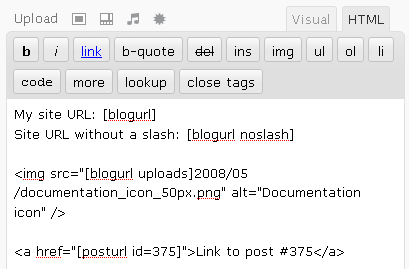
Once the plugin is installed, the three shortcodes available when you’re writing a post are [blogurl], [posturl], and [templateurl].
On my site:
- [blogurl] will generate http://www.theblog.ca/
- [blogurl wordpress] will generate the URL to the root of your WordPress files, if they are in a different location than your site root
- [blogurl noslash] will generate http://www.theblog.ca
- [blogurl uploads] will generate http://www.theblog.ca/wp-content/uploads/
- [blogurl uploads noslash] will generate http://www.theblog.ca/wp-content/uploads
- [posturl id=375] will generate http://www.theblog.ca/blog-url-shortcodes
- <a href="[posturl id=360]">recent post about recycling</a> will generate recent post about recycling
- [templateurl] will generate the URL to your parent theme’s root
- [childtemplateurl] will generate the URL to your child theme’s root
Download Peter’s Blog URL Shortcodes
 Facebook
 Twitter
 Email this
 keung.biz. Hire my web consulting services at
  Follow us on Twitter


November 17th, 2008 at 6:08 am
Jim says:
Hey, Peter, have you considered adding your plugins to the official WordPress.org plugin repository? I’ve pretty much taken to not downloading any plugins that aren’t on their site, simply from the perspective of getting the updates as they come available. I do like the idea of this plugin, though, as there are times I’ve wanted a quick and easy way to insert my link.
November 17th, 2008 at 4:48 pm
Peter says:
Thanks for the suggestion, Jim. I hope to have it on wordpress.org soon. You can see the other plugins (not a comprehensive list, sadly) I’ve added here.
Update: this plugin has now been added to: http://wordpress.org/extend/plugins/peters-blog-url-shortcodes/
November 19th, 2008 at 5:18 pm
nancy aka money coach says:
Hey Peter – that raises a question for me. The plugin above suggests duplicate content (or is it truly just duplicate images?) which is something I’ve wondered about – I’d like to post my blog entries on my www.yourmoneybydesign.com site as well. However, I’ve heard google downgrades you for doing that. Do you know anything about that? Awesome plugin, btw. I’m going to tweet about it.
November 19th, 2008 at 5:20 pm
nancy aka money coach says:
oops – pardon – I think I misread the first paragraph. You’re simply referring to changing the existing blog’s url, not duplicate content.
November 19th, 2008 at 5:30 pm
Peter says:
Hey Nancy, no worries Regarding the duplicate content issue, I haven’t had to deal with it, but if you’re just double posting, from what I know you’re just forcing Google to choose which post to display in their results. It might only show the post from one of the sites — not a huge problem if it comes to that.
December 5th, 2008 at 5:01 am
Steve Bossman says:
Thank you all for you suggestions will give it a go!
January 11th, 2009 at 1:18 pm
Daniel N. Lang says:
Thanks, Peter. I’ve been looking for such a plugin a long time ago already, but have so far never found one. My skills are too limited to set it into practice, otherwise I would have tried it myself. Do you have any reports about conflicts with other plugins? I’m thinking about giving it a try, too.
January 11th, 2009 at 3:44 pm
Peter says:
Hi Daniel, so far I have not received any reports of conflicts with other plugins. If there are any conflicts, I will certainly look into addressing them.
February 13th, 2009 at 8:58 am
Mario says:
Your plug-in returns the WordPress URL and not the blog URL. I have WordPress in a subfolder called WordPress. My blog url is http://site.com and my WordPress URL is http://site.com/wordpress. The latter is what your plug-in returns. For an update, it would be nice, if [blogurl] would return what I have entered under "Blog Address (URL)" in the settings. Otherwise it is rather irritating. Another [wordpressurl] tag would then be nice in addition to [blogurl].
February 14th, 2009 at 11:34 am
Peter says:
Thanks for pointing that out, Mario. I’ll add that for a future release. In the meantime, if anybody needs that URL distinction, you can follow the code in my plugin and use get_option(‘home’) for that value instead of get_option(‘siteurl’).
April 1st, 2009 at 3:01 am
Austin @ NicheWeapons says:
Brilliant, thank you Peter – was just looking into shortcodes to do exactly this
May 22nd, 2009 at 3:30 pm
Greg says:
I desperately want this plugin to work, but I’m having some issues with it. I’m running WP 2.7.1 with this plugin installed, yet everytime I try to use the shortcode, it doesn’t convert the tag to the URL.. I just see "[blogurl]" in the middle of my page. Does the plugin definitely work with 2.7.1, and I’m just doing something stupid?
Reply from Peter: Yes, it is confirmed to be working with 2.7.1 with and without the visual editor enabled. Perhaps there is a conflicting plugin or somehow it isn’t actually activated?
August 4th, 2009 at 10:21 am
Jen says:
Is there a way to get this to work in custom fields?
Reply from Peter: There may be a way to parse custom fields the same way as post / page bodies, but off the top of my head I do not know how.
November 24th, 2009 at 8:14 pm
Don says:
How would I add a token for [admin_email]?
I tried but failed to hack it. I looks like any option for ‘get_bloginfo’ should work…I’m not good enough to figure it out I guess…any help? I’d like to just add this to what is there already…this plugin is so cool!
Reply from Peter: It would look something like:
function adminEmailFunc() {
return get_bloginfo( ‘admin_email’ );
}
add_shortcode(‘admin_email’, ‘adminEmailFunc’);
November 25th, 2009 at 3:51 pm
Don says:
Unbelievable! A free plugin and you help me hack it for free. You are extraordinary, Sir!
November 30th, 2009 at 12:27 pm
Eric says:
Peter, can you supply me with the code I would be able to use for your plugin to insert a short code for the post title?
Thanks,
Eric
Reply from Peter: The example two posts above should give you enough of a framework. You have to search the WordPress documentation to see how to access the post title generally. Due to the number of requests that I get, the volunteer time I can dedicate is limited.
February 16th, 2010 at 8:52 pm
Nathan Sudds says:
Maybe it was easier than I expected, there were a few references to siteurl in the plugin code — just wondering if I need to change more than one. I changed the one in the first line: $blogurl_settings['siteurl'] = get_option(‘siteurl’);
TO
$blogurl_settings['siteurl'] = get_option(‘home’);
That works for the [blogurl] do I need to change anything for uploads?
Reply from Peter: I’ve released an updated version that will differentiate [blogurl] from [blogurl wordpress]
February 16th, 2010 at 8:45 pm
Nathan Sudds says:
Hi Peter,
Great plugin — have you made any progress with updating the plugin to support using this with WordPress in a subdirectory as mentioned by Mario above?
If it would be possible to provide more details on what to edit in the plugin code that would be great — I think your plugin has some great potential for people who install WordPress in subdirectory for development and then use the Move your wordpress directory steps (http://codex.wordpress.org/Giving_WordPress_Its_Own_Directory ) to make it live at the root url of the site. This keeps any hardcoded links from being broken when the permalink structure changes for launch
Thanks again
Nathan
August 31st, 2010 at 7:47 am
Agnes says:
Excellent!
I was trying (and havent succedeed) to find a suitable exec-php (one that would not force to turn off visual editor), just to call the <?php bloginfo(‘template_url’)?> function to call images. Now, I dont need more, I can use your [blogurl].
On top of the blogurl upload, I think a blogurl template may be useful.
Thanks
Agnes
October 8th, 2010 at 8:20 am
Agnes says:
Thanks Peter, the plugin is very useful and I found nothing else to fill that function.
I am using it mostly to insert images into the pages.
One frustration though (unless it is me doing sthg wrong?):
It has to be done in HTML mode – I can do, but the clients when they want to update will have trouble.
Is there any way to use through the WYSYWYG editor? (am using tinymce advanced editor)
Thks
Agnes
PS: more preciserl, for example when I insert an image or other item from media library, I need to change in HTML to avcoid the absolute path reference and use shortcodes. Any way to avoid that?
Reply from Peter: You can use [blogurl] in the TinyMCE view. Also, in the image properties box, you can also use [blogurl] in the “Link URL” field, as well as in the “Source” field in the “Advanced Settings” tab. I haven’t looked into how to affect the default-generated URLs nor to create a completely new button and new dialog / properties box behavior.
October 13th, 2010 at 11:12 pm
Agnes says:
This is great Peter, Am using in every web.
I would love a [template url] shortcode added though
Thks
Agnes
Reply from Peter: I just released version 0.2 with the shortcode [templateurl]
March 6th, 2011 at 1:07 am
A says:
I have a question about the templateurl shortcode: Do you use the template_url or stylesheet_directory? Because those are two different things and if I’m using a child theme, it’ll call the *parent* theme instead. Might be better if you had a stylesheet_directory shortcode as well.
Also, hope you can check if this is compatible with WP 3.1. Thank you.
Reply from Peter: Thanks for the feedback. It is compatible with WordPress 3.1. It uses get_bloginfo( ‘template_url’ ) (which you can change near the top of the plugin file). However, you are right that I should add [childtemplateurl] (and have that output stylesheet_directory) as well. I’ve now released that with version 0.3.
July 27th, 2011 at 2:31 pm
Eric says:
Helpful plugin, Peter. Thanks! I should point out that although WP’s default uploads directory is wp-content/uploads, the plugin doesn’t know that; at least it didn’t work that way for me… I had to manually enter wp-content/uploads in Media Settings in order for the ‘uploads’ shortcode to work. Other than that, it’s great.
Reply from Peter: Thanks for pointing that out. The plugin has a setting for that to be hard-coded near the bottom of the file, but I should probably have a smarter automatic fallback in a subsequent plugin release.
November 21st, 2011 at 9:59 am
Dee says:
Hi Peter,
Is it possible to use your shortcode plugin to auto generate the NEW post URL vs having to put in an ID# for some other random post? For example, I use CPMage by Greg Jacobs. It’s a plugin that generates articles from various directories, etc… and i use their keyword tag to generate the post and the content {KEYWORD}. Is it possible to use your code to ensure that when a NEW post is generated it will know to pull the URL of that NEW POST? Here’s the use of your code, and wondering if it would work for my needs? See below:
<a href= "[posturl]">{KEYWORD}</a>
Reply from Peter: I’m not sure if I completely understand the use case, but I’m guessing that my plugin is not what you are looking for. The “posturl” shortcode as implemented is only for the article in which it is placed. You’d have to write your own custom logic to have it based on anything other than the current post.
November 21st, 2011 at 10:30 am
Dee says:
Hi Peter, actually your shortocde plugin works PERFECTLY for what I need it for. I tested it with my existing content generator plugin using the code I mentioned above along with your shortcode inside the URL. And it generated the exact "same post URL" once newly generated…
<a href= "[posturl]">{KEYWORD}</a>
…now turned the new post with my chosen keyword to
<a href= "[posturl]">Test Post Code</a>
…and on my actual blog the keyword now has an internal permalink structure linking to its own post.
Thanks for this great shortcode!
January 7th, 2012 at 6:06 am
Micki says:
Hi,
I’ve just found and started to use the plug-in. It’s mostly working nicely and really helps out when deploying a site to a live location.
I however have one issue: When changing to short codes I cannot get the pictures to appear in the visual editor. Everything works fine when you view the page but in the visual editor I just get a broken link icon instead of the picture.
Does anyone have any insight into this?
(I’m using WordPress 3.2.1)
Reply from Peter: I don’t know of an easy solution to that, but perhaps someone else can share their findings!
October 7th, 2013 at 11:51 am
Stratos Nikolaidis says:
Peter, hi. Nice plugin, I would suggest you to "expand" it and include shortcodes in menu also!
Reply from Peter: Thanks — that is a good suggestion. It might take a while for me to add it, but in the meantime I’d be happy to accept code submissions!
February 5th, 2014 at 8:52 am
Bill says:
Will the use of these shortcodes cut down on server resource usage in comparison to the bloginfo() or get_bloginfo() functions?
I am curious if they actually store the info into global variables instead of making php calls to mysql for each instance used in the code.
If they do…is it per users browser session or per webpage load?
Reply from Peter: I don’t know for sure, but I don’t think short codes help with resource usage. However, the data behind it is probably cached within a page request in a global variable.
March 12th, 2015 at 11:27 am
Kyle Lynn says:
Would it be possible to use this plugin to append text to the end of the current url.
For example: I have this page: http://fabricmate.com/product/anchorage-panel-fabric-asteroid
On the page I want to have a link that adds "-sample" to the end of the url to get to the page to buy the sample.
This will make it so we have the same code on every product page but it dynamically generates the link so we don’t have to change it for every product.
Reply from Peter: You definitely could copy any of the PHP functions in the plugin and create your own that would append text at the end.
April 28th, 2018 at 3:53 pm
broozar says:
Hi, I am trying to have a website that supports both http and https. [blogurl] always returns the string for siteurl in the general options, which can have only have one value. It’s not too hard to change it in the plugin myself, I just thought it would be a nice addition to your plugin if you dynamically switched between http(s) automatically.