Version 2.2.0: Peter’s Collaboration E-mails for WordPress
First published on July 21, 2008
Here’s a plugin I wrote to take advantage of the pending review feature available in WordPress 2.3 and higher. Note that the latest version of this plugin requires WordPress 3.0 and higher.
With the default pending review feature, you can have “Contributor” users who can write posts. However, these posts are not published until an “Editor” or “Administrator” user comes along and approves the post. What this plugin does is send e-mails at three steps:
- When a Contributor user submits an article for review: The plugin e-mails a list of moderators of your choice, letting them know that there is a post ready for review, and giving them a link to edit the post.
- When a post is approved: The original Contributor user gets an e-mail saying that their post has been approved and who it was approved by. If the post was directly published, the author is given a link to read the post as the whole world sees it. If the post is scheduled to be published, the author is informed of the time that their post will go live. When the post does go live, the author will get another e-mail informing him / her of that.
- When a post’s status is changed back to “draft” from “pending”: The original Contributor user gets an e-mail saying that their post has been reverted back to a draft, along with a link to edit and re-submit the post.
You can assign specific moderators (these must be Administrator or Editor users) to specific Contributor users:
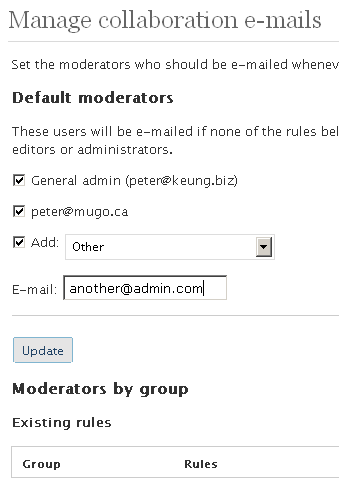
When used with Peter’s Post Notes on WordPress 2.7 and higher, users can leave notes to accompany the e-mails for each step in the workflow.
Get the plugin
Without further ado:
Download Version 2.2.0 of Peter’s Collaboration E-mails for WordPress [July 27, 2016: Replace use of deprecated get_currentuserinfo function. (Thanks Kyle!)]
February 15, 2010: Enhanced version 1.3.3 by François Elie: Adds the ability to define moderators by page; and tree-based page/category moderator fallback logic (by François Elie)
Translations
The following translations are included with the plugin download. Note that version 1.5.0 of the plugin included a lot of new (and untranslated) strings. Please send me any updated or new translation files!
- Castilian Spanish translation by Guillermo and Luis
- Italian translation by Massimo Santi
- French translation by Romain
- Japanese translation by Kazuhiro Terada and Hijili Kosugi
- Brazilian Portuguese translation by Murillo Ferrari
- Romanian translation by Gabriel Berzescu
- Polish translation by Michal Rozmiarek
- German translation by Rian Klijn
- Dutch translation by Rene and Dennis Koot
- Russian translation by Doktor Bro
- Turkish translation by Can Kaya
- Catalan translation by Aleix
- Danish translation by Tom
- Indonesian translation by Syamsul Alam
- Czech translation by Michal Kuk
- Irish translation by Jordan Silaen
Download an old WordPress MU version (not updated since version 1.3.0 of the plugin) here.
Version 2.2.0 [July 27, 2016: Replace use of deprecated get_currentuserinfo function. (Thanks Kyle!)]
Version 2.1.0 [February 12, 2016: Do not e-mail private notes -- new with Peter's Post Notes 1.6.0 and up.]
Version 2.0.0 [Optional message to thank the author for their submission. Also: fixed the scheduled post timestamp. (Thanks Luis González Jaime!)]
Version 1.9.3 [October 7, 2013: Minor button styling improvements. (Thanks daymobrew!) Also: support PHP 5 static function calls, bumping WordPress requirement to 3.2+.]
Version 1.9.2 [March 29, 2013: Bug fix: In some cases, custom taxonomies weren't showing up as an e-mail condition option. (Thanks boxcarpress and jswan2!)]
Version 1.9.1 [January 29, 2013: Fix bug from previous release that broke front-end post submissions.]
Version 1.9.0 [January 23, 2013: Allow editing of plugin settings via the WordPress admin interface so that settings persist after upgrades.]
Version 1.8.2 [January 13, 2013: Fix e-mail text about the author of a post if it has been set by another user. (Thanks Alexander!) Allow editors to manage collaboration e-mail settings in WordPress 3.5+ (required capability is now "manage_categories" instead of "manage_links").]
Version 1.8.1 [October 8, 2012: Rewrite function that gets post type moderators to support collaborators with more restricted permissions. (Thanks Harold!)]
Version 1.8.0 [October 5, 2012: Added approver_user_id custom field upon pending-to-publish and pending-to-future transitions. (Thanks Chris Andrews!)]
Version 1.7.1 [October 3, 2012: Minor fixes for translations. (Thanks Hijili Kosugi!)]
Version 1.7.0 [September 22, 2012: Added e-mails at the "private-to-published" transition (enabled by default), and if a post is edited AND commented using the Peter's Post Notes plugin by another user (thanks Erik!) (disabled by default).]
Version 1.6.2 [September 22, 2011: Minor code edit for WordPress 3.3 compatibility.]
Version 1.6.1 [August 13, 2011: Minor code cleanup to remove unnecessary error notices.]
Version 1.6.0 [June 19, 2011: Added ability to specify contributor and moderator roles for sites with custom roles and capabilities.]
Version 1.5.0 [November 27, 2010: Support for custom post types and taxonomies.]
Version 1.4.0 [September 2, 2010: Added ability to specify contributor and moderator roles for sites with custom roles and capabilities.]
Version 1.3.5 [April 25, 2010: E-mails are now all encoded in UTF-8.]
Version 1.3.4 [January 11, 2010: Plugin now removes its database tables when it is uninstalled, instead of when it is deactivated. This prevents the collaboration rules from being deleted when upgrading WordPress automatically.]
Version 1.3.3 [September 22, 2009: Maintenance release to remove unnecessary code calls and increase security.]
Version 1.3.2 [June 27, 2009: Minor fixes for translations.]
Version 1.3.1 [June 19, 2009: Updated plugin for WordPress 2.8.]
Version 1.3.0 [February 16, 2009: Added e-mails at the "pending-to-future" and "future-to-publish" transitions.]
Version 1.2.2 [February 6, 2009: Added backwards translation support for WordPress 2.5.]
Version 1.2.1 [January 3, 2009: Added .po and .mo files for translators.]
Version 1.2.0 [December 10, 2008: Added another e-mail trigger: when a pending post's status is changed back to a draft. Also added interoperability with Peter's Post Notes (for WordPress 2.7 and up) so that users can leave descriptive notes at each step in the workflow.]
Version 1.1.0 [September 18, 2008: You can specify moderators per post category.]
Version 1.0.1 [August 7, 2008: Database table names no longer use a fixed prefix. They now use whatever your WordPress installation uses ("wp_" by default).]
Version 1.0.0 [July 22, 2008: You can now specify moderators per user.]
Version 0.2.0 [Nov 11, 2007: Two new options: 1) Specify a name and e-mail address to send all e-mails (instead of having the contributor as the sender for pending e-mails and the contributor as the sender for approval e-mails); and 2) Toggle whether to show the contributor, in the approval e-mail, which user approved his / her post.]
Version 0.1.0 [Oct 31, 2007: First version!]
Turkish translation of 0.2.0 by Baris.
Slovakian translation (UTF-8) of 0.1.0 translated by sir.peterson.
Installation
Simply unzip the file peters_collaboration_emails.php to your WordPress plugin directory. Then, activate it in the Plugins menu in the WordPress admin section.
Details about the e-mails sent (who the sender should be; whether the contributor should know who approved his/her post; and so on) are configured by editing the top of the plugin file itself. The default settings should be sufficient for most implementations.
Moderator rules are configured in the Settings > Collaboration e-mails admin menu. Moderators are Administrator or Editor users who should be notified whenever a post is submitted for review. You can create groups of Contributor users and assign different moderators for each group. In other words, different users can be notified based on who wrote a post. You can also assign moderators based on post categories. If a Contributor user belongs to multiple groups and/or a post has multiple categories, all moderators who have been assigned to the relevant groups and categories are e-mailed.
Troubleshooting
Now, whenever you release a plugin the first comments you usually receive are people who have trouble with your plugin. Hopefully I can build a brief troubleshooting section first:
– If you are not receiving any e-mails, make sure that the PHP mail() function is configured properly (ask your web host or if you’re computer-savvy, check it out yourself; or if you have credentials for an SMTP server, install and configure the WP Mail SMTP plugin). If you are trying to send to multiple recipients via SMTP, note that WordPress up to 2.8 has a bug; I described a fix in this post. Also make sure that a Contributor user has actually submitted a post for review.
– If you want to use this plugin with pages, you need to allow the Contributor user to actually create pages (as by default they cannot). Use a plugin such as Capability Manager to add the “edit pages” capability to the Contributor role. With that plugin, you can even create new roles if you’d like.
– If the plugin simply breaks, make sure you are using WordPress 2.5 or higher. Also check the settings near the top of the plugin file (in the WordPress admin section, go to Plugins > Plugin Editor > Peter’s Collaboration E-mails).
– Need help installing the plugin or customizing your installation? Hire my consulting services: peter mugo.ca!
 Facebook
 Twitter
 Email this
 keung.biz. Hire my web consulting services at
  Follow us on Twitter


November 1st, 2007 at 11:07 pm
n-blue says:
It’s interesting and useful for multiple authors blog. Can we impliment this for commenter. Like, email commenter when their comment that hold is approved.
November 2nd, 2007 at 4:11 am
sir.peterson says:
Hi,
I have localized this plugin to Slovak language(UTF-8)
Loocated at:
http://www.blogspot.sk/wp-content/plugins/peters_collaboration_emails_sk.phps
Keep up the good work, thanx.
P.
November 2nd, 2007 at 5:26 pm
Peter says:
sir.peterson: Thanks for the Slovak translation. This is now posted under the main download link.
n-blue: Here’s code for a plugin that e-mails the commenter when their held comment is approved:
http://www.theblog.ca/wp-content/uploads/2007/11/email_on_approve.txt
I don’t intend on providing support on such a plugin or developing it further, but anybody can feel free to use the code in there.
January 13th, 2008 at 3:34 pm
Rosyidi says:
it will be great if there is a option menu.
January 13th, 2008 at 3:42 pm
Peter says:
What options would you like? Or do you mean the same options that are in the plugin file, but in a graphical user interface?
January 14th, 2008 at 3:07 am
Rosyidi says:
Yes, in graphical user interface, so user can easily configure this plugin.
Couse some people don’t know to edit on php code, me too.
I think this is the only one plugin for contributor. So, that’s great. thank’s a lot.
Sorry bad English
January 17th, 2008 at 6:58 am
Steve says:
I put this in my school WPMU installation. It works great! Prior to installation, I had to ferret through each blog taking 8-10 mouse clicks whether they had a new post or not. Now I can approve that which is submitted and can do so with three clicks including opening the email! What a time saver!
You extended the utility of the recently (and incompletely) implemented “submit for review” option and made it truly usable.
Your commenting makes configuring straight forward. For some reason WPMU does not allow you to edit the file via the backend, rather one has to access it via ftp to edit. No problem for me or anyone who runs a WPMU installation.
Nice job! I’ll recommend this to all others who run educational blogs that require moderating.
Thanks!
January 22nd, 2008 at 12:47 am
Spiewgels says:
I hate being the idiot here but how exactly do I input the different editor’s e-mail addresses for the part where I add everyone that I want to be able to moderate posts ($pce_mods)? Do I just enter another e-mail address followed by a semi-colon? I’ve tried several different things and keep messing it up.
January 22nd, 2008 at 9:37 am
Peter says:
Hi Spiewgels,
Hi! Here’s an example if you wanted to add 5 e-mail addresses, not including the address that is configured as the administrator on your WordPress installation:
Replace:
$pce_mods[] = get_option('admin_email');With:
$pce_mods[] = '[email protected]';

$pce_mods[] = '[email protected]';

$pce_mods[] = '[email protected]';

$pce_mods[] = '[email protected]';

$pce_mods[] = '[email protected]';
January 25th, 2008 at 7:27 am
Matt Wiebe says:
Thanks for implementing this plugin. It’s quite shocking that this isn’t already a part of the WP core. What good is a “pending review” status if you don’t know about pending posts?
January 30th, 2008 at 8:57 am
lafig3 says:
Hello,
this extension is a very good idea, but I’m having trouble getting it to work. I think my php mail() function is working correctly, because I receive mails when users register on the blog. But when save a post with the pending for review option, I do not receive any mail. What can be the problem?
Thanks
January 30th, 2008 at 10:52 pm
Peter says:
Hi lafig3,
Without knowing more details it is difficult to guess what the problem is. This plugin should send an e-mail when a Contributor user clicks the “Submit for review” button, when the status of a post becomes “pending”. Another e-mail is sent when that post is approved.
If you are merely saving a post, nothing should happen. Also, nothing should happen if you are an Administrator, Editor or Author user (on default installs) and you make a new post.
January 31st, 2008 at 3:23 am
lafig3 says:
Thanks! I was saving the post as admin, that’s why I wasn’t receiving any warnings.
This is a very useful plugin, thank you!
March 3rd, 2008 at 12:33 pm
Jeromy says:
Found a bug (maybe you're already aware). If the contributor submits for review, than comes back and assigns a category, and clicks 'submit for review' again, it automatically approves and publishes the post. Not an issue for me cause I actually hide that panel to my authors. Just thought you should know. I'm using WP 2.3.3 with php5
April 5th, 2008 at 11:56 am
Peter says:
Hi Jeromy,
Thanks for pointing out the issue with the "submit for review" feature. Is this a problem only with my plugin? I was unable to reproduce this problem with and without my plugin with WordPress 2.3.3 and WordPress 2.5.
April 8th, 2008 at 9:06 pm
Ken says:
Im having the same issue as jeromy. contributors are inadvertently publishing posts without my approval. I wasn’t sure how they were doing it until I realized they were going back and making changes and re-submitting before I had a chance to approve.
April 8th, 2008 at 10:01 pm
Peter says:
I still cannot re-produce this error after multiple attempts, using a "contributor" user, making edits, changing categories, etc. Are you running any other plugins that might affect the publishing process?
April 11th, 2008 at 11:48 pm
Peter says:
Ah, I have finally reproduced this bug with a Contributor user account by first saving a draft, changing the status to "Private", then finally submitting it for review. The good news is, my plugin isn’t what’s causing it and this bug was supposedly fixed in WordPress 2.5 as reported here.
April 15th, 2008 at 9:53 am
shammi says:
what is the user is not a registered user. that creats a blog. will he get the mails when approved
April 15th, 2008 at 10:22 am
Peter says:
Hi shammi, this plugin only covers articles being approved and published so no, this plugin does not send an e-mail when a user account is approved.
July 7th, 2008 at 12:31 pm
Kris Rzepkowski says:
Hi Peter,
I’m trying to do what you said in your January 22nd comment. I’d like to have the email go to one other person beside the site admin. When I put in exactly what you have written as an example email address
$pce_mods[] = ‘[email protected]’;
and click Update file (WP 2.5.1 Plugin editor) I get a fatal error and the plugin deactivates. This is the error:
Parse error: syntax error, unexpected ‘@’ in /home2/ithirewi/public_html/wp-content/plugins/peters_collaboration_emails.php on line 26
Any ideas?? Thanks.
July 7th, 2008 at 12:42 pm
Peter says:
Hi Kris, this is almost certainly a case of weird characters. Be sure to use a straight apostrophe (or "single quote") instead of any curly version.
July 7th, 2008 at 12:51 pm
Kris Rzepkowski says:
Many thanks Peter. That was the fix. I copied the text right from your comment rather than from a text editor. I’m not experienced enough to recognize the cause. Great plugin!
July 11th, 2008 at 6:54 am
sean says:
Works like a charm.
One feature I would like to see is the ability to assign a specific editor to a specific (or multiple) contributor(s). Our company has multiple departments that would use a work flow of a lower level contributor that writes a post and then their specific department head would act as editor and approve that post.
Thanks for a great plug in!
July 13th, 2008 at 3:17 pm
Alasdair Davies says:
Fantastic plugin, and great work. Thank you!
I too like Sean, would be delighted if it proves possible to modify the plugin to select an email address to send a notification to based on the category the contributer posted a blog.
Is such a thing possible?
Many kind regards,
Alasdair
July 13th, 2008 at 3:28 pm
Peter says:
Yes, it would certainly be possible to craft a solution with different "approvers" being notified based on the user who posted it (Sean’s need). I have a possible framework for this in my head but can’t guarantee that I’ll be able to get to it any time soon due to other work taking more priority. Anybody want to help?
Setting different approvers based on the category (Alasdair’s need) is more difficult but still do-able. If this is built on top of user-dependent approvers, this would require a more sophisticated set of approval rules. (Check by user, then category or vice versa?) And what if it’s posted to multiple categories? Which category would take precedence?
July 13th, 2008 at 6:14 pm
Alasdair Davies says:
Hi Peter,
I think Sean’s needs would work perfectly looking at the solution again. Different approvers would do the same job, and prevent the need to specify which category should take precedence.
I’d love to help update the plugin, but am more a designer than a coder I’m afraid – hopefully someone can help you with the framework though.
Keep up the good work.
July 14th, 2008 at 5:47 am
sean says:
Like Alasdair, I am more of a designer than a developer – I am afraid I don’t know my way around php/mysql enough to be much help here. Perhaps, seeing that there is a desire for this type of functionality among the community, some one with a little more expertise may be able to jump in and take a shot at it. Thanks guys!
July 23rd, 2008 at 7:21 am
Philix says:
Thanks, this is exactly what i was looking for.
July 28th, 2008 at 1:49 pm
Alasdair Davies says:
Thanks for the update Peter,
Downloading it now – Speedy update too. Add a donation button to your site and I’ll send you a thank you.
Cheers,
Alasdair
August 3rd, 2008 at 1:26 pm
Pxl_Buzzard says:
I love the idea of the plugin; however, I’m have 4 authors that I check before I publish their posts. Would it be possible to code in different user level support?
August 3rd, 2008 at 3:42 pm
Peter says:
Hi, I’m not 100% what you mean, but I think this is already possible. You would 1) Assign these users the built-in Contributor role, then 2) Add them to a group in my plugin with you as the moderator.
August 3rd, 2008 at 5:00 pm
Pxl_Buzzard says:
But see, I like them having the power that comes with being an Author still. Or what if I wanted to check an editor’s work? I think it would be beneficial to add the choice of user roles to the plugin.
August 3rd, 2008 at 5:07 pm
Peter says:
So you mean: even if those users can immediately post their changes (and have those changes live on the site), you still want to be notified whenever anything written by them has been updated. If so, this is certainly do-able, although I’ll have to take some time to think about whether this would fit with the intention of the plugin.
August 5th, 2008 at 9:11 pm
Jean-Paul Horn says:
Love the plugin. This is really useful for our multi-author blog. Could you please add a fix for table prefixes in your next version? Our table names aren’t prefixed with wp_, but with our websitename. Your plugin creates two tables with the standard wp_ prefix and has some usermeta checks against wp_capabilities, which is called example_capabilities for our database. The prefix may be configured in wp_config.php if I recall correctly.
I have already fixed this is in my own install, but it might be handy for future versions
August 6th, 2008 at 11:54 pm
Peter says:
Thanks for the feedback, Jean-Paul. I’ve now addressed both these issues in version 1.0.1.
August 7th, 2008 at 12:24 am
Jean-Paul Horn says:
Thanks for the quick fix, Peter. Again, a very useful plugin!
September 14th, 2008 at 11:21 am
Daisy says:
I see some others have requested this…but it would be really great to be able to assign an notification email to categories rather than lists of individual contributors. With 300+ contributors each reporting to a category editor it would make life much easier to not have to keep the groups continually updated.
September 18th, 2008 at 12:06 am
Peter says:
I’ve just released Version 1.1.0 to include category-specific moderators.
December 11th, 2008 at 10:09 pm
AndrewJ says:
This plugin is great – super helpful to keep notes while i’m drafting a post so that I can outline and keep track of my thoughts…
Are you planning on adding a feature where you can delete or modify existing notes? would be helpful so that i don’t add so many notes that i fill up my screen : -)
once again, thanks for the effort for developing!
December 11th, 2008 at 10:17 pm
Peter says:
Good idea regarding the ability to delete a note. I’ll get that into the next version, whenever that will be
December 28, 2008 update: version 0.2 of the post notes plugin includes the ability to edit and delete a note.
December 17th, 2008 at 11:49 pm
michael boldin says:
Just tested this out in 2.7 – and it’s working perfectly!
Only one question/request – is it possible to have it send out a notice that a post is published on “scheduled” posts?
For example, a contributor submits a post for review on 12/17. I review the post on 12/17 and schedule the post for publication on 12/19 at 8:10am. Is there a way for the plugin to notify the contributor on 12/19 at 8:10am that their post was published?
It only sends out mail at the moment I publish the post, but no email is being sent for posts scheduled for publication in the future.
December 18th, 2008 at 3:06 pm
Peter says:
Hi michael, it would be possible to “hook” into that transition. Perhaps a future release?
February 5th, 2009 at 8:00 am
Willy Galleta says:
Hi. I’ve been using the plugin for some time and I translated and adapted the previous version. But when I actualized it, I lost the translation. Obvious.
However I tried to localize it with de .po and .mo files, but when I upload the new .mo file, nothing changes.
Am I missing something? I’ve tried in a new clean WP and it doesn’t work either.
I’ve used Poedit for generating the .mo.
Thanks.
February 6th, 2009 at 10:38 am
Peter says:
Hi Willy,
I’ve discovered that WordPress defaults to the en_US locale, so you need to name the .mo file "peters_collaboration_emails-en_US.mo" or replace "en_US" if you have set the locale to something else. If you’re using a WordPress version earlier than 2.6, you should put the .mo file one level up, in the “plugins” directory.
February 11th, 2009 at 5:44 am
Daisy says:
I have been using this plugin for some time now on a massively multi-author website and it’s been a real help. I noticed, however, that contributors are only notified when their posts are published and not when they are scheduled to publish. I think it would be great to have them be notified that a post was scheduled, the date it was scheduled for, and then another notification when the post actually posts.
I modified my installation to notify when status changes from pending to future but it would be great if the function were extended to cover all the possible post status transition possibilities.
February 14th, 2009 at 9:37 am
Peter says:
Hi Daisy,
Did you simply add another condition such as this?
if ($pce_newstatus == ‘future’ && $pce_oldstatus == ‘pending’) {
// code
}
If so, did you try something like this for the scheduled publication notification?
if ($pce_newstatus == ‘publish’ && $pce_oldstatus == ‘future’) {
// code
}
The "future" to "publish" transition is the one transition that isn’t done by a user in the back-end interface, so you’ll have to remove the is_admin test that encapsulates most of the plugin.
February 15th, 2009 at 5:59 pm
Daisy says:
Thanks Peter,
I pretty much just replaced the check for the pending to published transition to be pending to future instead. That more or less handles my immediate need for contributors to know that their post was accepted for publication. Sometime when I have time I might just tweak it a bit more to include the scheduled date/time that the post is scheduled to go live, that would serve just about as well as a second email to notify that the post went from future to publish.
It would be nice to see the other options incorporated, though. I can see how having to remove the is_admin check might not be the greatest thing.
February 15th, 2009 at 9:17 pm
Peter says:
The is_admin checks whether you are in the administration interface, so in this case it’s only for efficiency of code — for example, the management interface code doesn’t need to be available on the front-end. If you (or I, if I get to it) implement the "future-to-publish" transition, it will be necessary — but not harmful — to expose the main plugin function to the front-end as well.
Update: the discussed functionality has now been added to version 1.3.0.
February 17th, 2009 at 8:52 am
Daisy says:
Just saw the new version is out. Thanks so much!
June 17th, 2009 at 12:41 pm
Hector Parra says:
Peter, since the last WordPress 2.8 it seems like one gets emails even when editing as admin/editor other people’s posts before publishing. Would it be easy to make it work as before so we don’t get emailed about our own changes? Thanks and congratulations for this useful plugin! Hector
Reply from Peter: Thanks for pointing that out. I have now released version 1.3.1, which does not send that “pending-to-pending” e-mail. I’m not sure why WordPress 2.8 internally considers that to be a so-called post transition, but we’ll work around that
June 29th, 2009 at 3:33 am
Bob Murray says:
Hey Peter – thanks so much for this – it works right out of the box. I had been using Dagon Design’s Draft Notification – and getting emails every time a contributor just opened the post page. Now, I just get bonafide posts notifications and the contributor gets alerted when I approve too. Thanks again!
July 20th, 2009 at 12:24 pm
Matt says:
We’re having a problem where the notifications only work if just a single email address is entered. If there is more than one selected then no one gets the notifications. Is this expected behavior and if not is there some kind of workaround?
Reply from Peter: if there is only one moderator per entry (you don’t enter something like “[email protected], [email protected]” in one entry), and multiple moderators are checked, the plugin should work. If that’s not the problem, are you using another plugin that might change the way WordPress sends e-mails?
September 4th, 2009 at 6:14 am
Ellen says:
This is a terrific plugin, but I have a unique problem I’m wondering if you can shed any light on, Peter:
I’m using a separate plugin that enables custom post statuses (additional ones other than "Draft" or "Pending Review.") Unfortunately, when a post is approved and published while it’s got one of these custom statuses (an example: "Ready to Publish"), the e-mail does not get triggered to send to the contributor. It appears that a post is only triggered to get sent to the contributor if it changes from "Pending Review" to "Published." (If it changes from "Ready to Publish" to "Published" then nothing happens.)
I’m hoping this isn’t a limitation of the WordPress core functions, and maybe there is something that can be altered in your plugin to accommodate these custom post statuses. Unfortunately the custom statuses are very important to our approval workflow and we can’t drop them.
Reply from Peter: It depends on whether that plugin’s custom post statuses integrate with the same way WordPress handles its statuses. I have not looked into the pluggability of WordPress’s post statuses; however, my plugin hooks into the core WordPress filter transition_post_status() and then checks the new status and old status values. If your custom statuses are available in that filter, you can also trigger e-mails by following the same model as in my plugin’s code.
September 20th, 2009 at 1:50 pm
Aren Cambre says:
I installed this module and added three admins, including myself, to the "Default moderators" area. None of the Group or Category areas have any users.
From the description of "Default moderators" ("These users will be e-mailed if none of the rules below match."), it appears that all three of these people should get all notifications, including but not limited to new users and comments awaiting moderation.
I know there’s no problem with my email address because I do get notifications if it’s in the "Settings > General > E-mail address" field.
I intended to use this module solely to have notifications sent to more than one person. Did I misinterpret its purpose?
September 20th, 2009 at 6:58 pm
Aren Cambre says:
I just realized I didn’t state the problem in the prior comment: None of the three "Default moderators" get any notifications. Only the email in "Settings > General > E-mail address" gets notifications.
Reply from Peter: Are you using any e-mail-related plugins? I did experience an issue once where WordPress did not support multiple recipients via SMTP. I wrote a post describing a fix.
September 28th, 2009 at 6:36 pm
Aren Cambre says:
Here’s what I have installed:
* Add to Any: Share/Bookmark/Email Button
* Akismet
* All in One SEO Pack
* Google Analytics for WordPress
* Peter’s Collaboration E-mails
* Viper’s Video Quicktags
* WP-reCAPTCHA
I don’t think these should interfere?
I just did a fresh test of the plugin under two WP 2.8.4 environments — where PHP uses sendmail and where PHP directly uses SMTP. Unfortunately (for you) I was able to set up multiple moderators and successfully received multiple collaboration notifications. While I did not install your plugins, it is not obvious that they would cause any problems. My only other suggestions at this point are obvious ones: spam filters, syntax errors, version problems, etc.
September 30th, 2009 at 5:06 pm
Aren Cambre says:
What I don’t get is why does the normal admin notification work but this doesn’t?
In case it matters, the customer’s blog is hosted at godaddy–which blows, but that’s a different story.
October 12th, 2009 at 5:21 pm
Aren Cambre says:
I disabled _all_ modules except Peter’s Collaboration E-mails. I then created a special account with only Subscriber privileges, logged in to the blog using that special account, and left a comment on a blog post.
My personal email is one of the "Default moderators", and I still did not receive an email. Yes, I did check my spam folder.
Reply from Peter: Now that you say “left a comment” perhaps there is actually a misinterpretation of what the plugin does (and by re-reading your initial comment, I’m pretty sure I completely missed what you were asking). It e-mails so-called approvers when contributors submit new posts, not comments. You could definitely write a plugin to handle e-mailing around comments by hooking into the appropriate action. Feel free to continue this discussion via e-mail (my e-mail address is on the right sidebar).
October 13th, 2009 at 8:05 am
Aren Cambre says:
Aww, shucks. I was hoping this module included comments, but I understand the limitation as comments are a lower order of content. Well, thanks anyway.
November 23rd, 2009 at 5:15 pm
jc says:
I am getting my site ready, and have installed Collaboration Emails 1.3.3.
I noticed this error message (see below) which is visible only when a user with collaborator status logs in. I am using WP 2.8.6, so I understand there may be issues….
This notice appears on the Dashboard page, somewhat down the page in a box called "Collaboration notes"
—————
WordPress database error: [You have an error in your SQL syntax; check the manual that corresponds to your MySQL server version for the right syntax to use near ') ORDER BY notetime DESC LIMIT 5' at line 1]
SELECT postid, author, notetime, notecontent FROM wp_collabnotes WHERE postid IN () ORDER BY notetime DESC LIMIT 5
No relevant notes.
———–
What do I need to do to resolve this issue, as I would really like to use your plugin at my new site to be…
Update from Peter: This was actually an issue with the Post Notes plugin and fixed in the latest release of that plugin.
November 30th, 2009 at 2:24 pm
Ali Erkurt says:
Hello everyone! I’ve just translated the plugin to Turkish and it’s ready to be downloaded. Peter, could you please add the .mo file to the plugin please? Here’s the download link:
http://www.allaboutali.com/dosyalar/peters_collaboration_emails-tr_TR.mo
Thank you for that great plugin
Reply from Peter: Thanks! Is there also an accompanying .po file? I always include both .mo and .po in the releases so that users can edit the translations if needed.
December 16th, 2009 at 7:05 pm
jc says:
Peter,
I love your collaboration and notes plugins and use them in a 2.8.6 php 5.1+ platform, they work flawlessly…but I would like my editor to be able to get emails for submissions even from those who have statuses higher than contributor, and yes I use the capabilities plugin.
How can I do that? presently the collaboration settings only allows the selection of those who have collaborator status, and alas, the higher ups need editing supervision too.
Reply from Peter: Presumably this means that you have some extra roles that don’t have “publish posts” capabilities? Using the default WordPress capabilities, an editor that does not have the permissions to publish his/her own posts cannot also publish other editors’ posts. Under that assumption, if you want to add other user roles to the contributor list in my plugin, you can edit the “switch” statement in the pce_usersoptions function and modify the $pce_contrib_approve_code “contributor” code to add other roles in a similar way to the “moderators” code directly below it.
January 6th, 2010 at 8:04 pm
Erika Jurney says:
I LOVE this plugin and have been using it for a while now. I’ve recently come up against a new situation and I’m wondering if the plugin could potentially handle it.
I’m running a series of articles where I would really love to be able to put an email address in a custom field and have *that* address treated as if it were the post author’s address.
So when the post is scheduled and posted that address would get the mail.
Does this make sense? Does it seem reasonable?
Thanks very much,
Erika
Reply from Peter: This is certainly possible. If you look at this piece of code, you can replace $pce_thisuser->user_email with the contents of the custom field:
// Send the notification e-mail for a previously-scheduled, now published post
wp_mail($pce_thisuser->user_email, $pce_subject, $pce_body, $pce_headers);
This custom field is probably accessed with something like get_post_meta( $pce_object->ID, ‘name_of_field’, true ); See the WordPress documentation on get_post_meta.
January 27th, 2010 at 6:25 pm
ashley says:
Hi there
I’m considering a project for which this plugin might be useful, but it would be an absolute perfect fit if the Contributor could also be notified when their post was deleted. The situation would be that many people could contribute posts, but only one would be published per day, with the rest being deleted to save room in my DB (the posts would include media files). I’d love to let the unpublished Contributors know that their post is no longer in the running.
I hope it’s a feature you’d consider adding!
Reply from Peter: There is a WordPress action “delete_post” that you can hook into and use the passed post ID to do things such as send e-mails. Or, using the post notes plugin, save a note saying “Thanks, this post will be deleted”, then delete the post.
March 15th, 2010 at 5:13 am
Maky says:
Thanks for the nice plugin. Is there an option to edit the emails that are sent or are they hard coded ?
Reply from Peter: By your definition, they are “hard-coded” in the plugin file itself, but the text isn’t too hard to find
April 6th, 2010 at 5:08 pm
Wayne says:
Peter,
The plugin absolutely rocks.
I was wondering if its possible to add another layer of collab to the plugin.
I’d like only a specific group to publish, whereas editors can ‘ready for publishing’ an article.
I’m wondering how difficult it would be to edit this plugin to do something like this.
I was considering just editing the ‘publish’ to ‘ready for publish’ and creating a new class of moderators.
what do you think?
Reply from Peter: My plugin hooks into how WordPress handles post status changes, so what you are looking to do probably relates to users and roles — that requires a slightly different way of approaching the problem. There are some good solutions that wouldn’t involve modifying my plugin. You could either turn your editors into contributor users (a group that is default to eZ Publish) or use a plugin such as this one to create custom roles where your editors cannot directly publish.
May 10th, 2010 at 7:04 pm
camyden says:
Peter.. really looking forward to using this.. but getting an error can you help me out please?
Warning: Invalid argument supplied for foreach() in …wp-content/plugins/peters-collaboration-e-mails/peters_collaboration_emails.php on line 1062
Reply from Peter: That error suggests that no default moderator exists. Check that the wp_collaboration table was created and that it has an entry for collabgroup of 1. If not, try re-installing the plugin or manually adding the tables in the pce_install() function in the plugin file.
June 23rd, 2010 at 9:23 am
Gweb says:
Nice plugin, Peter!
Is there any way that editors and admins can get the "your post has been published" email that the contributor gets when their post is published?
Reply from Peter: Possible, yes. You’ll have to take a look at the code block underneath “// E-mail the post author to let them know that their post has been published” and then write your own logic to add additional recipients.
August 16th, 2010 at 3:36 am
Nele says:
Hello Peter, thanks a lot for this plugin! I’m also surprised it isnt part of WordPress main code yet
However, apparently it doesnt want to send mails to the moderators that I entered that should get a mail when a post is pending review, not even when there’s only one.
I am using the SMTP plugin since mailing didnt work otherwise. I installed the plugin you provided for smtp-users, and it didnt solve the problem either.
I made sure a contributor posted a ‘submit for review’, and mails from comments are also working – it’s just your plugin that doesn’t want to send e-mails.
My wordpress version is 3.01
Reply from Peter: I tried to reproduce the problem on WordPress 3.0.1 with and without the SMTP plugin, with and without multiple moderators, and with and without moderators per group. However, e-mails were received in every case. To help debug, look for the pce_pending function in the plugin, then throw in some die(‘hello’); statements in the “// E-mail moderator(s) for pending posts” section. If you can confirm that the e-mail is attempting to be sent, you could then try looking in the file wp-includes/pluggable.php, inserting a “var_dump( $phpmailer ); die();” before the return statement in the wp_mail function. Then, see if there are any useful error messages after you post something as a contributor.
August 19th, 2010 at 9:20 am
Ren says:
Same problem as previous poster.
Your plugin does not send emails to the moderator. Otherwise it works great
Reply from Peter: Please see my response above — hopefully that can help identify the issue.
September 5th, 2010 at 4:59 pm
Barbara says:
I just wanted to write and say thank you for this wonderful plugin, along with the Post notes plugin.
I have a site I’m building running a coupon script for wordpress, and this plugin helped me be able to:
a.) get notified with a new coupon submission
b.) send a nice note to the submitter when approved
c.) send a rejection notice with reasons using the "trash" status and the Post Notes
Your code was easy to follow, beautifully documented and easy to modify for my needs.
Thank you again!
September 10th, 2010 at 1:39 am
Matt Pealing says:
Thanks a lot for the plugin, exactly what I needed for my business directory!
Just one question / suggestion, is it possible to customise the email that is sent to the contributor when their post has been approved? This would be ideal
Reply from Peter: Yes, you can customise it. Within the plugin file itself, look for the text below “elseif (‘pending’ == $pce_oldstatus && ‘publish’ == $pce_newstatus)”. Or, create your own .po and .mo (WordPress standards) translation file.
September 13th, 2010 at 4:31 pm
Bernard says:
Hello Peter : )
)
I have installed your plugin in one of my blog where I have contributors, authors and some other roles I created with another plugin (user Role Editor).
Your plugin works perfectly for the new "contributor" which is the role by default I give to new users registered.
when this new Contributor send his first post, all is working fine. I receive as admin a message to review the pending message and so..
BUT (always a "but"…
when if I erase his post (not permitted or not written under the blog rules…) the contributor can go back to the blog, write a new post (maybe the same one!!!) and ..troubles —> message is not put on "Pending" but directly published.
Any idea to stop this ?
Can I contract you to explain in details my needs and make some customization ?
Reply from Peter: Unfortunately I’m not taking on new work for at least the next few weeks. However, I’ll try to give some tips. First, try upgrading to the latest version of WordPress if you haven’t already. Then, deactivate my plugin and see if the problem still occurs. This doesn’t sound like something my plugin would cause, because it just sends messages at every step — it doesn’t actually modify any of the steps.
November 8th, 2010 at 5:28 am
Doktor Bro says:
I’m glad to have completed the Russian translation.
This plugin is one of the most useful ever. The whole hierarchical thing with Contributor, Editor, etc. just doesn’t make sense without the email notification. I’m wondering how WordPress wants to be used by professional teams without that plugin from Peter.
December 16th, 2010 at 11:22 am
Abraham says:
I am writing this comment to thanks you for developing this plugin. It’s a wonderful feature for wordpress to have and I can’t think of a reason why WordPress does not have this by default.
I am just having a little problem when this plugin is active with another plugin and wanted to know if this plugin has compatibility issues with WyPiekacz.
When WyPiekacz is active, all posts submitted go as Drafts instead of "Pending". When posts are not in Pending queue then Collaboration Emails don’t work.
http://wordpress.org/extend/plugins/wypiekacz/
So, is it a compatibility issue?
Many many thanks for the help/.
Reply from Peter: At first glance, there isn’t a compatibility problem — my plugin acts on the status change, and if no status change happens, there is no “hook” for the functionality to occur. From looking at WyPiekacz, if your post meets the proper conditions, then the transition to “Pending” will occur, and the e-mails should fire if relevant.
December 21st, 2010 at 2:06 am
Benz1 says:
Absolutely brilliant plugin Peter, especially used with the Notes plugin. Good to see you’re still supporting it. Shows how useful the plugin is and how popular it still is.
The initial email to the moderator works fine as does the email to the contributor when it’s published but should it send an email to the contributor if the moderator doesn’t publish a post but instead adds some notes for the contributor to amend something and clicks on Save as Pending again? And likewise, if the contributor then updates it and clicks on Submit for Review again? From a workflow point of view it should but maybe it doesn’t because the status isn’t actually changing? Is there any way for this to happen? (If it already does this then apologies, obviously something wrong at my end.)
Thanks in advance.
Reply from Peter: It’s true that it doesn’t send notification of a note if the status hasn’t changed. However, the suggested workflow if something needs to be reviewed is that the approver puts the status back to draft (which will trigger an e-mail), and then the contributor can change the status from draft to pending again (which will trigger an e-mail).
December 25th, 2010 at 7:34 pm
Barbara says:
Hi Peter,
I love your plugin, and I’m wondering if there is any way to support html emails?
Thanks in advance and happy holidays!
Barbara
Reply from Peter: At the moment, this is not supported. I probably won’t add support for that anytime soon, as I’d want to add a truly flexible system where you could edit the HTML e-mail templates too. If you want to hack the plugin to send HTML e-mails, go for it! Check out this topic for a small development hint: http://wordpress.org/support/topic/wp_mail_content_type
December 26th, 2010 at 12:37 am
Shristy says:
I have been using this script with great success in my article directory, though have not yet tried to edit the php code (have quite a weakness in that), is there a way to control the email being sent:
Like can we schedule all emails to be sent at a particular time of the day
Is there a way to edit the content of the email
This has become necessary since i am running an article site and it receives a lot of submissions and approvals, which keep sending mails all through the day and somehow the host is not liking it, if i can schedule these at a particular time of the day it would have been great.
Reply from Peter: You can edit the contents of the e-mails by editing the plugin file itself (you should be able to find the text) or by editing one of the included translation files. As for batch e-mail sending, this is currently not possible — you’d have to write a separate system for queuing the e-mails. One alternative that might appease your web host is to look into using a third-party service such as http://www.authsmtp.com (not free, but quite cheap) to send e-mails. You’ll also need use a plugin such as this if you choose to go the external SMTP route.
January 30th, 2011 at 8:02 am
Abraham says:
Peter,
As I said before this plugin is wonderful. Do you have any plans to add a feature where Admin/Editor is able to send an email to the author that his/her article has been rejected?
It can work in the same as now where I can write a note with your other plugin and when I publish an article that note is sent to the author along with the acceptance email.
Thanks
Ab
Reply from Peter: There is already this feature for when the status is changed back to “draft” from “pending”. If you also need to trash the article, you could just change it back to draft first, or modify the code to recognize the transition directly from “pending” to “trash”.
February 1st, 2011 at 8:48 am
John says:
Is this tested with multi-site?
I get it to work on my main site, but on the other sites, I don’t get any e-mails when posts are submitted for review…
For my main site, I see "General admin", but not on the other sites. I can choose "Add", but nothing happens.
When trying to add a "Moderators by group", I get:
**** ERROR: Unknown query error when creating new group ****
on the other sites. Works on main site.
Reply from Peter: I’m not completely familiar with MU plugin activation anymore, but you probably need to activate the plugin per site, not network-wide.
April 17th, 2011 at 2:07 am
Abbas says:
Thanks , it’s very nice plugin ,
but i am facing problem . i am using [capsman] plugin – Capability . I am creating different group of contributers and different group of authors , and i am not getting the users list in you plugin
Reply from Peter: You can add new roles to the $pce_contributor_roles and $pce_moderator_roles settings, defined near the top of the collaboration e-mails plugin file.
May 15th, 2011 at 1:12 pm
Tarik Barraj says:
hello,
i want to translate this plugin to arabic language
how i can do it ?
which file i should to edit ?
thanks
Reply from Peter: Thanks for your interest. The plugin package comes with peters_collaboration_emails.mo and peters_collaboration_emails.po, which you can use to create your own translation files. (General WordPress translation information is available here.)
June 6th, 2011 at 7:14 pm
Pit says:
Hello,
What a great plugin!
But I am having a problem, when I write a note in a post in the dashboard of the other user will not come up the note, but it will show in the collaboration note of the person who wrote it.
how can everyone see the note?
Thanks!
ps: it works ok in my other website.
Reply from Peter: I’m not exactly sure what you’re asking. However, it sounds like it might be related to one of the settings that are configurable near the top of the plugin file. Be sure to read through those settings.
June 18th, 2011 at 6:45 pm
spidey says:
how exactly to add the custom field, could you please elaborate with example with complete line of code.
should it be like this,
wp_mail($pce_get_post_meta( $pce_object->ID, ‘name_of_field’, true );->user_email, $pce_subject, $pce_body, $pce_headers);
and secondly after see it here: get_permalink,
i would like to add few extra lines, if am trying to do that then it gives me an error and automatically disables the plugin.
please guide and help.
thanks so much for such wonderful plugin.
Reply from Peter: get_post_meta seems to be the correct function:
$custom_email_field = get_post_meta( $pce_object->ID, ‘custom_email_field’, true );
// Presumes that you are sure that $custom_email_field is set. Might want to use a fallback if it’s empty or “false”
wp_mail( $custom_email_field, $pce_subject, $pce_body, $pce_headers)
I’m not completely sure what else you’re trying to add and where, but it’s probably just a matter of fiddling with the syntax.
July 25th, 2011 at 4:59 pm
Sarina says:
Hello there. Great work on the plugin however I am getting notified about posts being live on posts that I (admin) have written. I would like the notifications to only be sent re: users whose role is ‘Contributor’. My understanding was that this was the default action so any assistance would be appreciated. Also, is the plugin compatible with Lifestream as right now I am also getting notifications of Lifestream events (as well as my own admin composed posts). I would like to find a way to disable both.
Reply from Peter: It will send an e-mail if the post status went from “pending” or “future” to “published”, no matter the role of the user. Of course, typically only Contributor posts go through the “pending” status first. As for Lifestream, I’m not familiar with that plugin, but if there’s an identifying characteristic of such posts, you could easily modify the plugin code to exclude notifications on those posts. (Although I’m not sure why such posts would go through the WordPress publishing workflow rather than being directly published.)
August 5th, 2011 at 2:46 pm
Lloyd DeKay says:
Hi Peter,
I had a problem with trying to set up on a multi-site subsite, kept getting an error when I tried to add someone to receive the notices. I did a Network Deactivate and then Activated on each separate subsite. All seems to be working well now. Just suggests it’s not multi-site compliant but the work around is fairly painless.
Thanks for the plugin, should make life simpler and the Inbox fatter.
August 23rd, 2011 at 12:21 pm
Julien says:
Hello peter,
Thanks for your usefull plugin. I would like to know if you can update it to add a functionality.
If the post is published, it send an email but not if it’s refused. It’s possible to send an email when the contributor’s post is placed to trash (garbage) ?
Thank you very much !
Reply from Peter: There’s an e-mail sent when a post is rejected (sent back to draft) but not when trashed. There is probably a post status transition for “trash”, in which case anyone could easily extend the code. I’m not sure when I’ll work on the plugin next, but it could be a future addition.
November 14th, 2011 at 6:32 am
Seolita says:
Hi Peter,
I think it would be great if you could add an option on the admin page (/options-general.php?page=peters_collaboration_emails.php) to choose the default language of the mails.
Best,
Bert
Reply from Peter: The translation of the e-mails is currently controlled by the language of your WordPress installation, so if the desired translation is available, it should automatically be used if your WordPress language is set to that.
November 14th, 2011 at 1:50 pm
Seolita says:
OK Peter, sorry, I meet translation troubles with your other plugin: "Peter’s Post Notes".
In a French WP, I still have "Your post has been reverted back to draft status by [...]".
Reply from Peter: Ah, I see. Looks like some of the translation strings in the French translation file remain incomplete. You can download a program such as Poedit to update the translation files included in both plugins.
November 19th, 2011 at 5:36 am
Anomaly says:
wanted to know if this plugin can send a mail to a particular id or maybe all registered users whenever a post is directly published by a Author. Its working great for me for contributor but really wanted to inform all the members about any post that is publish… hope you can help me in this plugin or any other
Reply from Peter: It’s possible, but I’d suggest building something separately where you manually trigger the e-mail by clicking a button, or have people subscribe for e-mail updates on an RSS feed instead.
December 8th, 2011 at 2:16 pm
michelle says:
Hi Peter,
This looks like an awesome plugin, really! I have one question though, is it possible to change the default name of contributor to something else? I ask because we are using a front end blog posting mechanism and have already set basic contributors up with a different name via a roles plugin. They still have the same privileges as contributors. I just wondered if there was anything we could do to change the name of contributors in your plugin to bring up our list of contributors of a different name?
Many thanks.
Reply from Peter: If I’m understanding the issue correctly, try looking at the $pce_contributor_roles setting near the top of the plugin file.
December 15th, 2011 at 12:44 pm
Anna-Karina says:
Great plugin!! But… how can I change the date format in my emails now it’s in UTC gmt_offset ? (in your peters_collaboration_emails.phpabout line 278)
I want more something like j F Y format. Is that possible? Can you tell if and how I can change that part?
Thanks!
Reply from Peter: You could wrap $pce_object->post_date in the mysql2date function as detailed in this thread.
January 3rd, 2012 at 4:02 am
Ruben says:
Hi Peter, great plugin!
The fact is that I cannot make it to work if WP-Mail-SMTP is active. And I need it because I’ve to send by SMTP. Both plugins are updated, 0.9.1 for WP-Mail-SMTP and 1.6.2 for yours, working in WP 3.3.
Thanks!
Reply from Peter: Have you tested normal WordPress e-mails (such as registration or forgot password e-mails) with the SMTP plugin? The collaboration e-mails plugin does not have any specific e-mail requirements, as long as normal WordPress e-mails are working.
January 4th, 2012 at 6:12 pm
Charles LaRocca says:
Peter, rather than limiting the pending posts to "contributors" why not allow us to choose what users will create pending alerts? I would like to be alerted no matter who submits a pending post. Is there a way to do that? I am surprised no one has ever requested this functionality.
Reply from Peter: The default logic within WordPress to force posts into the pending queue is based on whether a user is in the contributor group. However, if you have some custom roles and capabilities that force other groups of users into the pending queue, you can have them appear in the management interface by altering the $pce_contributor_roles setting in the plugin.
January 5th, 2012 at 1:56 am
Ruben says:
Hi Peter,
The SMTP plugin works ok, for example, with forgot-password.
Reply from Peter: I cannot think of a code-related reason why it wouldn’t work. It might be something more basic, such as your SMTP server only allowing certain senders, and the contributor you’re testing with (whose e-mail address is used as the sender) is not allowed.