Beware of the bilingual Canadian keyboard layout
First published on November 20, 2009
Last updated: July 13, 2012
If you’re looking to buy a computer in Canada, or more importantly a laptop, you will probably look at things like brand, screen size, battery life, hard drive space, operating system, CPU speed, RAM, and other even more technical aspects. However, don’t forget to look at the keyboard layout.
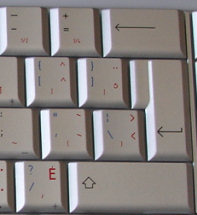
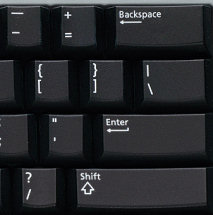
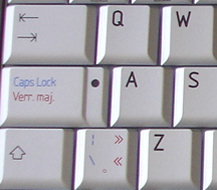
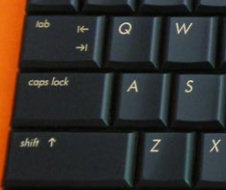
Many computers in Canada come with a bilingual keyboard layout, which is different than a US-style, “English-only” keyboard. If you or the person you’re buying the computer for is used to the US-style keyboard, certain properties might be difficult to adjust to. Here are two of the most obviously differences in those keyboard layouts:
Tall and narrow bilingual Enter key and the short and fat US Enter key:
Narrow bilingual left Shift key and the wider US left Shift key:
If the bilingual keyboard layout (or US layout, to be fair) really bugs you regarding a computer you already own, you can search around for a replacement keyboard with the layout that you want. You’ve got to be careful when replacing laptop keyboards, but it’s certainly a possibility.
—————————–
Check out this creative solution to the issue, Press Shift, which provides you a customized Shift key and instructions to re-map your keys.
 Facebook
 Twitter
 Email this
 keung.biz. Hire my web consulting services at
  Follow us on Twitter


November 26th, 2009 at 5:44 pm
JaneB says:
Also, for people who want a bilingual keyboard the cheap and easy way, just get the usual US keyboard and (in Windows) go to the control panel and set the language to Canadian English and the keyboard to the Canadian Multilingual Standard. Forget about this changing the physical keyboard thing, just let the software remap a few keys! No numerical codes for accents, no weird enter key, just a few remapped keys on the right hand side. If you don’t touch-type, you can buy little decals and stick them on the keys….
November 28th, 2009 at 8:41 am
Claire says:
The number of keyboard layouts a bilingual Canadian has to remember in order to type in both languages is nuts. I have a laptop that has a US keyboard and a Canadian multilingual keyboard that I plug in when at my desk. When I set to French, a lot of the characters are set to different keys and for some reason the keyboard at work has yet another layout in French. Drives me a little crazy, especially as a couple of mystery characters just don’t seem to exist in some layouts but, still, maybe it’ll help prevent Alzheimer’s one day.
January 6th, 2010 at 9:05 pm
Cam says:
My bilingual keyboard looks worse. The right shift key is half the original size and is shared with another | and \ key. I bought mine online so I didn’t know what the keyboard would be like. Because of this layout, I’ll probably be buying my laptops from the States from now on, or at least going in-store to make sure I’m accustomed to the keyboards.
February 23rd, 2010 at 11:26 am
Kevin J. Woolley says:
The only problem I’ve found with switching keyboard layouts on a standard US keyboard is that you lose a couple of characters — I can’t remember which ones off the top of my head (backslash?), but they were deal-breakers for me, as I needed them for programming. The extra key to the left of Z is where those live on a bilingual/UK keyboard.
I still haven’t made up my mind how to fully deal with it, but I’m making do with knowing the finger dance to switch keyboard layouts quickly.
March 4th, 2010 at 11:04 am
Justin says:
I want to know who decided we should all adopt this multilingual keyboard layout and what does the extra backslash keys have to do with French anyway (see diagram above)? When did this keyboard layout take over? I’ve lived in Manitoba all my life and I don’t know a single person who speaks French and all I can find are laptops with these asinine multilingual keyboards. I spell colour with a ‘u’ and measure almost everything in metric but these keyboards are bu|| sh*t!
April 23rd, 2010 at 9:23 am
Chris says:
I couldn’t agree more with the guy above (Justin – March 4th, 2010)!! That horrendous multi-lingual keyboard layout that is forced on so many Canadians making a regular retail laptop purchase must be the product of a dysfunctional international committee. Shrinking two of the most commonly used keys on your keyboard in order to squeeze extra keys between in the way that they have done is an ergonomic disaster! If you look at the official layout <http://en.wikipedia.org/wiki/File:KB_Canadian_Multilingual_Standard.svg>, you can see the lunacy of it all–if they hadn’t overlaid so many keys with special characters (like fractions, copyright symbols, etc.) that are all accessible via software in the OS, there would have been no need to add extra physical keys for the language modifiers. They could all have been accommodated as overlays on the existing keys of the standard US layout.
April 29th, 2010 at 9:45 am
Jeremy says:
Does anyone know how this fiasco happened?
Canadian vendors are not even allowed to import laptops with US keyboards.
Now I have to buy laptops from US vendors and import them in to Canada myself.
This is an absolute mess.
What committee was responsible for this?
This is an outrage!
Where can I vent my frustration?
April 30th, 2010 at 5:02 pm
Mario says:
Fortunately I’ve started to see again a few laptops with the English keyboard in Staples, Best Buy and Future Shop. They are usually "business laptops" like the HP Probook.
Let’s cross our collective fingers!!!!
May 11th, 2010 at 8:16 am
Pam says:
I can’t use the new keyboards, my fingers are too small to use the left shift key. And I am a grown-up. Really.
May 18th, 2010 at 8:44 am
Lia says:
I wish I had seen this page before I bought my new Acer Aspire 5741. Changing to Windows 7 was frustrating enough without throwing in a keyboard with flat keys that changed to French when you accidently hit shift and alt together. I am so far behind in my invoicing and correspondence that my boss is quite "unhappy". The extra cost to Canadians to be bilingual is much more than printing everything in 2 languages!
May 22nd, 2010 at 6:04 pm
Joe Hann says:
I too am frustrated with this multilingual keyboard crap. Been three days trying to find out how to input an apostrophe s! Acer or Windows 7 onboard help is no help.
May 29th, 2010 at 7:59 am
Darren says:
The Canadian multi-lingual keyboard is complete crap.
We have been using US-English keyboards in this country for 30 years. All desktop computers and all Apple computers still come with US-English keyboards, and it’s outrageous that Canadian retailers are now stocking only multi-lingual laptops.
I never have and never will buy a laptop with a multi-lingual keyboard. When you buy your next laptop, demand a US-English keyboard, and if they won’t give it to you then order your laptop on-line.
June 8th, 2010 at 6:17 am
kzaban says:
I’d like to chime in too. I HATE THE BILINGUAL KEYBOARD on Laptops.
I haven’t bought a laptop since these new keyboards appeared. I cannot for the life of me use the left shift properly since it is now smaller. Dell for sure has not opt for the bilingual crap keyboards but still holding out. PLEASE KEEP THE BILINGUAL STUFF IN QUEBEC and BRING BACK THE REGULAR KEYBOARD FOR THE REST OF THE PROVINCES IN CANADA !!!! Hello….!!!!!
June 16th, 2010 at 6:28 pm
Frédéric says:
I’m fluently bilingual and have typed French on computers for over 15 years. US keyboards have absolutely no key missing to type anything we want, I have no idea where these "bilingual" keyboards come from. I can’t stand them.
June 21st, 2010 at 3:22 pm
Geof says:
I just discovered this problem. I checked Costco, London Drugs, and Staples. This is infuriating. I am happy French Canadians can find what they want (assuming this broken layout is it – what hunt-and-peck committee thought the caps lock key is more important than shift?), but this is unusable to me. I live in BC. I know lots of people who type Chinese. No-one who types French. The situation is ridiculous. I am planning a shopping trip to the States to get something sane. I have contacted those retailers and I urge others do spend a couple of minutes and do the same. You would think if they can sell laptops in blue and pink they might also consider selling machines with usable keyboards.
Reply from Peter: Check some of the smaller retailers. I picked up an Asus laptop with a nice keyboard
June 29th, 2010 at 7:05 pm
Debbie says:
It’s time to stand up people. I just bought a new laptop and after 24 hours I am returning it. I have used the English keyboard in school and now in business. Who said it should be changed? Certainly not the paying public. For some it may be too late to return but
ATTN ALL FIRST TIMERS – IF YOU DON’T LIKE IT TAKE IT BACK AND COMPLAIN. TELL THEM YOU’LL ORDER FROM A BUSINESS WHO WILL GIVE YOU WHAT YOU NEED. YES, TAKE YOUR BUSINESS ELSEWHERE.
July 12th, 2010 at 7:49 pm
Darryl says:
24 hours – wow – I’m impressed you lasted that long. I lasted about 3 hours. The manager at Best Buy did not seem surprised at all. Obviously the returns of these ridiculous keyboards are piling up. So for anyone out there with this ‘non-standard’ keyboard, RETURN IT. If we as a public cannot be heard, maybe the business community will be! I have not seen anything so ridiculous in my life!
July 14th, 2010 at 8:28 am
Stephen says:
Let me make a suggestion.
Look in the mirror. If you don’t know what you are buying, it is your own fault.
The keyboard is specified by the buyer, and I have yet to see a product SKU where the language was not clearly marked.
There is no great "French conspiracy" trying to force "French" keyboards on you. It is an option, like any other.
And that is quite apart from the fact that some people use that keyboard layout quite successfully, all the time. What it is, is *new to you*. You could take a few minutes to learn it (it isn’t hard — it’s a keyboard).
Or, you could stop complaining and return it for a US-104 keyboard (or exchange your laptop).
And next time you order a computer… look more closely at the product description.
"Caveat emptor."
July 16th, 2010 at 5:24 pm
Gerry says:
yup hate these bi keyboards as well, bought one – samsung r380 with an i3 and can’t stand it – plug in an apple aluminum keyboard and remap the F13 key to insert with SharpKeys. Was going to buy one of 2 other laptops (Sony Vaio or Acer as843g – both awesome laptops) but said to salesguy "dealbreaker is the bilingual keyboard". Being a programmer I can’t be looking at they keys all day to figure out which key is where and then when you do look it’s all scattered with >> etc.
July 18th, 2010 at 7:38 pm
Max says:
Thank you for this post – I can’t stand these keyboards! When did this mass migration happen? Like Geof I know lots of people who type Chinese (me included) – where’s my keyboard? (FYI computers in Hong Kong are sold proper US keyboards)
I have been using a Mac laptop for four years and thought I would buy a little laptop just for working (Office for Mac is worthless). Going to FS and BB I found all laptops these stupid keyboard layouts (except for Dell and Apple – good for them), and ordering from Costco I got the same terrible keyboard, after making sure the images of the product on the website showed a proper US keyboard. This is crazy – I have found a number of laptops that I would buy (HP, Sony, Toshiba) and the dealbreaker is the keyboard! Forget it, I’m getting one from the US on eBay or through a reshipping service. I’ll probably get a better deal anyway. UGH.
August 2nd, 2010 at 3:28 pm
Don Gibbs says:
Lets all sign this petition to bring back the regular keyboard!!
www.petitiononline.com/mod_perl/signed.cgi?KEYBOARD
August 17th, 2010 at 10:39 pm
Adam says:
Keyboard layout is useless. What moron came up with this. Shift key is way too short I can’t reach it and enter just literally sucks. Returning laptop tomorrow!. Sorry Acer though you make decent machines, you’ve lost my sale!
August 18th, 2010 at 8:14 pm
Stephen S says:
To Stephen above:
>>Let me make a suggestion.
>>
>>Look in the mirror. If you don’t know what you are buying, it is your own fault.
>>
>>The keyboard is specified by the buyer, and I have yet to see a product SKU >>where the language was not clearly marked.
If this was something people could choose that might make sense. I think what pisses people off (me included) is that the retailers are saying that this is the only keyboard layout they are legally permitted to sell in Canada.
September 15th, 2010 at 10:26 am
Peter says:
I just ordered a laptop from the US to get around the asinine keyboard layout. According to some retailers I’ve talked to, the multi-lingual keyboards are mandated by law. The fact that you can find a few laptops still with US keyboards is because they are either older stock or were imported into Canada from the US. Give it a another year and you won’t be able to find any US keyboard computer for sale in Canada.
September 25th, 2010 at 2:46 pm
Blondie says:
I think alot of you missed the point of a Bilingual Keyboard.
I was raised in a French community, French school system and English family (in Ontario). At school we were trained to type with a CANADIAN MULTILINGUAL keyboard. I work in a mostly English workplace, thus we have Standard Canadian English Keyboards. I also know there is a standard Canadian French keyboard setting. AND THEN there is the US English keyboard setting. As long as you have the proper setting, it does not matter what the keys have displayed on them, unless you aren’t a proficient typer; then it isn’t about hate the product, it is about the used needing education. Yeah, once in a while I get pissed off because it changes settings on me (or more aptly, I accidentally, without realising, hit the switch keys – Usually Ctrl + Alt + other).
If you like a US keyboard, go to the US and buy. Canada should not be forced to sell them simply because certain areas of the country pay more attention to the Southern culture than our own.
And a few comments on keep the French in Quebec….well, let me tell you, NEW BRUNSWICK is the ONLY bilingual province. Quebec is French, the rest are English, but they all recognise the second non-official language as official because of the Charter.
AND there are MORE THAN half a million FRANCOPHONES living in Ontario…that does not include those like me who self identify either French OR English.
Just sayin….
September 27th, 2010 at 10:22 pm
Karin says:
Wow, finding this blog is like finding a support group. I had no idea this was mandated — just frightening. It’s especially refreshing to read the French/bi-lingual posters who ALSO hate these keyboards (as do EVERY SINGLE PERSON I ASK). I almost ordered a laptop on line, and then went to Best Buy and to Future Shop only to find that the keyboards on all the models have this crappy layout (my fingers are also not long enough to reach the Shift key). I wrote in on the online forms to both stores complaining about the lack of choice, and about the ignorance of the staff ("You must have been looking at the US site" — then we looked at his own store’s website and voila! There were the large, normal Shift keys… "Well, that’s why we have a 15-day return policy"… argh!!!!!! What if I had ordered it and then it shows up with this ridiculous keyboard???). If anyone knows who to tell/write to/talk to who might change this "legislation" please post it — I’m just dumbfounded by this.
September 27th, 2010 at 11:51 pm
Karin says:
@ Blondie — drive to the US to buy a US keyboard? Really!? Come on, we just want the right to CHOOSE which one we buy! The charter (language rights) is defined as being able to work and speak in the language you choose. I want that same right (and I bet the retailers do too). I love French and have very close French friends. But I really resent law dictating to me what I can purchase especially when it affects my work and life.
September 29th, 2010 at 12:26 am
Nordic says:
@Blondie — you are missing the point. It is about the PHYSICAL DESIGN/LAYOUT of the keyboard, not the settings. The consumer should have the right to buy the standard (US) keyboard design if that is what he/she wants or needs for whatever reasons — e.g., to more easily do their programming work, to more easily type in their mother tongue that is neither English nor French (like Chinese), to accommodate their old arthritic fingers, to make it easier to reach the keys quickly with small hands. This is a multi-cultural, diverse country, not just a French or English one. This is a very narrow and paternalistic design decision being imposed on consumers. It is wrong and retailers should see the error if enough consumers wake up and go elsewhere (which is easy to do online these days) and/or return the product as "dissatisfactory", "doesn’t meet my needs". The dollar usually speaks loudly, but this is politically correct Canada.
September 29th, 2010 at 8:23 pm
Linda says:
I just bought an hp laptop from costco today. I knew it was bilingual but I didn’t notice that the shift key was so small, I can’t use the shift key which is one of the most important keys on the keyboard. I will return this laptop asap although I love everything else about it but the keyboard just ruins everything! also all the extra symbols on the keyboard are annoying to look at, but I would keep it if it wasn’t for the shift key which I can’t stand. After finally finding the perfect laptop I have to return it. Does anyone know where I can purchase the same hp laptop with the US keyboard or if it’s possible to just replace the keyboard.
October 7th, 2010 at 3:04 pm
William says:
I, for one, like this new keyboard. Not only does it make it easier to type in French, but also in pretty much any European language not using cyrillic characters. It’s especially practical for those with a notebook or netbook lacking a traditional number pad on the right side of the keyboard. I have written in both French and German with the Canadian Multilingual keyboard, and after the requisite period needed for adjustment, I now find it to be far more accomodating than the old method of using a standard US keyboard with the character map. Most importantly, I note that while it seems to be a keyboard designed exclusively for typing French, it is just as convenient for Spanish, German, Serbo-Croatian or Polish as it is for French, as it includes all characters or "dead-keys" needed for the languages. Just my $0.02.
October 9th, 2010 at 7:22 pm
… says:
Future Shop and Best Buy only has those keyboards for laptops. I recall they have been like this for the last two years but it is getting worse and worse every year.
This is ridiculous. The only manufacturers you can guarantee that doesn’t have this French keyboard bullshit is Dell and Lenovo thinkpads but you have to order them online.
Sometimes, for netbooks, I want to try the keyboard since they are all non-standard. To decrease the size of the left shift key further is just a ridiculous compromise.
October 19th, 2010 at 10:19 pm
Jen says:
I’ve pretty much decided I’ll have to buy my next laptop in the US. I find the ISO layout (which is what the multilingual keyboards use, rather than the US ANSI style layout) is a huge cause of repetitive strain injuries.
The stretching your pinky has to do to reach the enter key is so much worse on the Canadian multilingual keyboard versus the US English one. It’s really lovely having to live with pain because someone thought I needed a bunch of characters for a language I don’t speak.
I also almost exclusively use the left Shift key and not the mile long right shift key, so I’m continually hitting the completely useless second backslash key on ISO/multilingual keyboards. Productivity = way down.
They are completely unwieldy and useless to me. I think at the VERY least, we should be able to have a choice of keyboard layouts.
Also, be very careful buying based on photos – many laptops on websites show the ANSI/US English layout in photos, but the computers are actually ISO/Canadian Multilingual because the photos are from the company’s US headquarters. You really need to be careful buying things sight unseen.
I will probably end up getting my laptop in the US, since it seems almost every company here in Canada has switched to the suck of ISO layout.
November 10th, 2010 at 6:45 pm
KEN says:
This multilingual keyboard is simply garbage. I had an HP laptop with it and couldn’t type a word without hitting that small "\" key near Left Shift. Returned the laptop and got the money back to buy another laptop with a normal keyboard. I learned my lesson – never ever again!
I think we should start a list of places where you can still get a normal keyboard. I know if you order online from Dell you can still get it, so there you go.
November 12th, 2010 at 4:34 pm
Ron says:
Best solution I’ve found is to remap the keys as you prefer them. It doesn’t overcome the physical layout, of course, but for one thing it helps with the #1 bug for me which is the too-small left shift key. I used KeyTweak which is easy to search and find. There are others.
Count me in as a hater of this stupid bilingual keyboard, too. Really, it boggles the mind what some people try to drive down our throats in Canada. I’m all for multiculturalism, but come on, don’t abandon ALL consideration for the rest of us (who still make up the majority, hello).
November 17th, 2010 at 11:10 pm
Sara says:
I hadn’t really realized there was so much hype and distress over this bilingual keyboard thing..
I just recently replaced my laptop, and while I was searching for options online I did notice that there were English/French/Bilingual options, but never really thought too much about it.
I went into FS and bought the hp I did mostly for the cost factor.. didn’t notice til I got home the part about it being a bilingual keyboard.
Personally, it wasn’t much of a bother for me at all (the only problem I had at first was that this keyboard has a set of command buttons on the far left side that are where my caps lock, shift, etc buttons used to start.. so I kept hitting those until my hands got used to being moved over slightly..)
The small size shift key or oddly shaped Enter key didn’t bother me either..
I’ve had it for about a week now and had absolutely no problems with it until tonight, when I noticed something missing that I obviously took for granted on my Sony Vaio!
I study Portuguese in school and have to use many of the symboled and accented letters when typing my homework.. On desktop computers or laptops with keyboards that have the extra number pad, this is no problem, since I could just use alt-codes.. (and in Word I can use their symbols) but on my Vaio I had the numlock option and the embedded number pad on the letters on my keyboard.. on this bilingual keyboard I don’t have that.. and I don’t even know how to make the French symbols work to my advantage!
Can someone help me learn to use this keyboard properly? Or bring back my numlock number pad
November 19th, 2010 at 1:59 pm
becca says:
On my first day of work for the federal government, i discovered the multilingual keyboard and learned that i would have to learn to use it. i spent a couple of evens with a keyboard manual and a few days making mistakes, but i learned how to adjust what i do. Sometimes i do hit a wrong key, and at those moments i use something called "patience" as i correct my error. i can’t get how up-in-arms people behave over such a minor thing, as if the barbarians were at the gates threatening to move our shift keys. It’s a friggin’ keyboard, people, so call off the dogs, please, lest all of Europe learn that we want keyboards that will prevent us from communicating with them.
As for key sizes, there is a smallish shift key on the left of my keyboard, but it is full-size on the right, as is the Return key. The reason the keys have been made so small on laptops is that the manufacturers are responding to consumer demand for smaller laptops. Less space = smaller keys. Take a look at the keys on your cell-phone. Are you rioting over the size of those???
Why are people so resistant to learning something new? Learning new ways of doing things and learning new languages have been shown to ward off alzheimer disease, so think about adapting to this change as preventative medicine.
November 22nd, 2010 at 4:14 pm
jdonder says:
becca said "Why are people so resistant to learning something new? Learning new ways of doing things and learning new languages have been shown to ward off alzheimer disease, so think about adapting to this change as preventative medicine."
You’re not serious now are you? This is not just about the placement of the keys, it’s about the complete mess of the labels, some keys have 5-6 things on it and most of it is never used, some of it is even redundant, because believe it or not, lots of characters appear twice on different keys, look at this image for example:
http://www.silentpcreview.com/files/images/samsung-n220/15-kb-20px1cm.jpg
And then you tell us that we should learn things we don’t need to ward of Alzheimer disease? I say it again; you’re not serious now are you?
November 22nd, 2010 at 4:20 pm
jdonder says:
And if you think that the following typical layout is beneficial to either the English or French part of Canada, then you seriously need to take a course in ergonomics….sigh:
http://i54.tinypic.com/14ctsb9.jpg
November 24th, 2010 at 9:12 pm
jen says:
The issue for me is that the ISO multilingual keyboard is responsible for me suffering from a repetitive strain injury in both hands. This injury has cost me money, time and productivity.
I would love the ability to choose which keyboard I want – ANSI or ISO layout (it’s not about the multilingual factor). Apple’s MacIntosh computers give users a choice of layouts. Unfortunately, I’m a Windows user.
This is not about "learning something new" – it’s about being in physical pain, paying for physiotherapy and taking anti-inflammatories and painkillers because I don’t have a choice of computer keyboard layouts.
Forcing an ISO layout on a country that has used ANSI layout since the advent of computers is ridiculous. I have seen plenty ISO layouts with multilingual capabilities. This switch to ISO has no merit.
November 26th, 2010 at 12:12 am
Stephen Hui says:
I first noticed multilingual keyboards about a year ago and have been steadfast avoiding them as much as I can. If I can’t get a US standard keyboard then I don’t buy it. For those of you who say this isn’t a big deal, do any of you folks know how to touch type? The only folks I’ve noticed that are unaffected are the folks who peck and hunt. Most of us who were formally trained in typing who can often break the 40 wpm find the new keyboards a disaster because it keeps causing errors. It isn’t easy to unlearn nearly 20 years of use on a standard US keyboard and to become good at it. Another point is that there is another keyboard standard that has proven to be better than QWERTY and that is the DVORAK style keyboards. Why hasn’t that become standard? At least that is proven to be faster for speed typists. This multilingual keyboard only benefits a very tiny group, I don’t even think French speaking folks like it because they’ve also used the US standard for years.
November 29th, 2010 at 4:13 pm
ray says:
I picked up an Acer laptop from Costco a couple of weeks ago with the specs I wanted at a great price, of course it has the bilingual keyboard. I kept an open mind though and tried it out for a couple of weeks. I can’t get used to the physical change especially the small left shift key. I’ve been touch typing for over 25 years now and it’s a painful change to try and make. My wife tried it too and refuses to use the computer now. I’m going to contact Acer to see if it’s possible to get the keyboard changed at a reasonable price. If not then this one is going back to Costco.
I’m all for multilingualism but what sucks here is you don’t have a choice of what to purchase for a keyboard.
November 29th, 2010 at 4:59 pm
ray says:
FYI, I just spoke to a representative at Acer who advised that there is no factory english keyboard available for the Aspire Model 5471-5869. I did give the representative some feedback though and he said he would take it to management…
So this computer is going back to Costco…which sucks as it was a great price
December 10th, 2010 at 7:28 pm
jen says:
I’ve asked at Futureshop as well as was told every keyboard on notebooks in the store only comes with the ISO multilingual keyboard – there is no choice as the Canadian manufacturers no longer make the ANSI layout.
December 13th, 2010 at 8:23 pm
Ellen says:
Just got a laptop with the Cdn Multilingual keyboard and I think it’s just fine!
I switched to the ‘Cdn multilingual keyboard’ layout about 3 years ago out of curiosity. I like it so much that whenever I use an American physical keyboard, I just switch the keyboard preference to it.
Every day, I work on both a physical American keyboard and also on a physical Cdn keyboard. I have had no problems switching back and forth. I notice the ‘enter’ key is a bit smaller on the Cdn keyboard. I’ve touch-typed for 20 years at about 80wpm in English. The layout is super convenient if you have to type in both English and French.
For the aggravated: just change the keyboard layout in the Control Panel of your computer and you can get the same layout as the physical American keyboard….all those missing or moved keys will be remapped to where you expect them.
Incidentally, the Cdn Multilingual keyboard (either the ‘layout’ or the physical keyboard) is hugely useful for other languages as well.
December 15th, 2010 at 6:01 am
Josh Brown says:
My girlfriend just got a new Dell for Xmas and it’s the first time I have seen one of these keyboards. They are horrid. I have small hands, and even at that hitting the ‘shift’ key while trying to type (as in typing while looking at the screen, not ‘hunt and peck’) is annoying as heck. It’s half the size of the old shift keys, so I end up hitting ‘\’ instead of ‘shift’. I can’t imagine ever adjusting to it. The ‘enter’ key I can adjust to, but not the shift key.
Regarding the post above, I don’t think there is anything I can change layout wise to fix that. If there is, please let me know.
December 15th, 2010 at 10:48 pm
Steve says:
The reality is French is a dying language. There are some that would say that in 50-100 years, the language will be all but dead and will be removed from the Charter. Already due to the language requirement, our senior government officials Surpreme Court is a lower caliber than it could be because some of the most intelligent and capable had chosen not to learn French.
But aside from that, Language of today follows wealth. At the moment, the most dominant currencies are English, Chinese, Japanese, and German (the Euro is still based on the Deutsch Mark). There is a reason why India is mandating English as a requirement for the kids.
There is nothing wrong with offering French as an option for keyboards. But please do not ruin the typing experience of the rest by including buttons between the most commonly depressed key on the keyboard like the LEFT SHIFT button with a completely useless key.
If they want to add keys, I do not mind if it is in an area that will not hinder my QWERTY daily typing experience. I use the LEFT SHIFT key a great deal and being forced to miss it and type a character that I will never use really pisses me off.
Why should I have to relearn the keyboard when the same cannot be said in reverse for the French typists. I typed French fine with an English keyboard. All the accents can be typed already with function keys and most of the Microsoft applications can add accents and symbols automatically now. These extra keys only add unnecessary hassles.
December 16th, 2010 at 1:47 am
Mark says:
I bought a DELL recently. I asked that I get the ANSI US standard keyboard and NOT the ISO French Canadian device. They said all their computers where ANSI…
They lied.
It showed up and its ISO. I program for a living (game dev) and the ‘|’ ‘\’ keys are kind of important and very familiar to me… I mean I never glance to check my fingers or keys for any reason. I think of what I want and it kind of just – happens.
Well, no longer. And no manner of registry editing to remap keys will get around the fact the damn enter key pushes up and over\ <—!!!
This is brutal.
Never going to buy a laptop in Canada anymore, will import from stores in the States and absolutely never from DELL.
Merci Quebec! Good work yet again annoying the rest of Canada with your insecurities and heavy handed politicking.
And cheers to DELL for outsourcing all your customer support and sales jobs to some country that isn’t trained well enough to understand that ISO != ANSI.
December 16th, 2010 at 1:52 pm
Josh Brown says:
I am not really a PC user, so maybe you guys can help. If there any sort of keymap function that I can use to change that "|\" key so that it can function as a shift key instead? Thanks.
December 23rd, 2010 at 8:30 pm
Neman says:
Just got a Dell Inspiron N5030 for the in-laws. Was surprised to see the keyboard upon unboxing, then when I started using it, I hated it. Later? Still hating. Switching to US layout helps, but putting the pipe/reverse solidus key in-between the z and left shift, and in-between the single quote and enter is a decision beyond all stupidity. But it does fall in-line with the original purpose of the QWERTY design – to slow down typists by making it more complicated.
Let’s see… how many times a day do you hit shift or enter? How many times a day do you type a | or a \? Seriously people, this is stupid.
Oh – the right ALT key is an ALT CAR key, which doesn’t help as much as you think.
Further on the theme of destroying productivity, THE #@^$(*&#ING FUNCTION KEYS NOW REQUIRE AN EXTRA KEYSTROKE! Yes, some genius has decided you’re more likely to change screen brightness than to use a function key, and has moved the F keys to be a secondary function. I press F11 all the time to toggle full-screen browsing; now I have to press Fn-F11. I press ALT-F4 countless times per day to close a program; now it’s Fn-ALT-F4.
Don’t think this is a big deal? Then I’m guessing you’re either hyper-brilliant, or you can’t touch-type. Watch anyone who’s efficient with a computer, and they all use the keyboard + shortcuts. Watch anyone who’s struggling with a computer, and cursing that everything takes a long time, and they use a mouse.
I’ve been touch typing since 1983, and haven’t really needed to type the 3/4 fraction all that often. WTF? (Come to think of it, a WTF button would be more useful than a 3/4 button.)
To the person who mentioned keyboards are getting smaller, well, that’s not the case on a laptop. A netbook maybe, but my Lenovo W500 (godsend) has a 12" wide keyboard. This Dell Inspiron N5030 keyboard is almost 13" wide. If they laid out the keys like an X-series ThinkPad, there would be room for a dedicated number pad (ASUS I love you for that) or a proper 3×2 grouping of the Insert/Home/etc. keys instead of the asinine vertical upside-down L layout which doesn’t pair the keys with any logic at all. (Why does PrntScr horizontally separate Insert and Delete? Why do they stick PgUp and PgDn vertically between Home and End?)
I might use AutoHotkey to remap the keys. There’s an excellent script I found to remap the stupid 000 button on my external numeric keypad to =. Check it out at http://www.autohotkey.com. The 000/= remapping script is at http://www.autohotkey.com/docs/scripts/Numpad000.htm.
KeyTweak is another option, but I haven’t tested it yet with this particular keyboard layout. The manual and the EXE are located at http://webpages.charter.net/krumsick.
December 23rd, 2010 at 9:24 pm
Neman says:
OMG OMG OMG
Windows 7 steps to revert to normal function key behaviour:
Control Panel -> Hardware and Sound -> Adjust commonly used mobility settings -> Fn Key Behavior
Change it to "Function key"
December 23rd, 2010 at 9:57 pm
Melissa says:
Just to give a different perspective, I’m an anglophone living in BC but I actually like the bi-lingual keyboard. I do a lot of writing in French and I like being able to type accents without having to use character map or other convoluted methods of getting them into my documents. It’s easy to switch between English or French settings on my Vaio. The only slight adjustment I had to get used to was the smaller enter and shift keys. It took all of a couple of hours to get used to. I think it offers a better option to the unilingual English keyboards we’ve always used. Nobody likes change, but once people get used to it, they realize it’s often better in the long run.
December 26th, 2010 at 4:47 am
Don says:
I was distressed to hear of problems with Dell. I’ve been shopping for a while and Dell and Apple were the only two manufacturers in the stores with a proper keyboard. The worst part of the problem for me is not that the Enter key is smaller it is that it is farther away from the colon key. Some genius inserted an extra key between the colon and Enter. As a touch-typer, my pinky has to stretch so far that my right hand strays off it’s home keys. After typing for over 40 years, I want technology to adjust to me, not the other way around. Further, I haven’t found a single retail clerk who understands or gives a damn.
Next time I want a laptop, I’m taking a little vacation south of the border. A few days in the sun and I can bring it home under my customs limit. As for Canadian retailers, they can go somewhere even hotter.
December 26th, 2010 at 4:06 pm
Hairball says:
I just bought a Dell Inspiron 15 N5030, it came with the bilingual keyboard. I was surprised because last year I got a Mini 10v and it was an English keyboard. It was one reason I wanted to buy from them again.
However I just called in and they were willing to send me an English keyboard to replace. I guess maybe when ordering just make a special request so you don’t have to receive this annoying thing.
December 31st, 2010 at 12:29 am
Frae says:
I am going through the same problem trying to find a NON bilingual laptop. I don’t agree that we don’t have the choice. I did see today on Apple’s site that you do have the choice which is fantastic but I just can’t afford an of the Apple laptops. I’d like to know who made the choice to change the keyboard and why and why can’t we choose which style we want. If I can pick a colour, the screen size, etc…why can’t we choose if we want bilingual or not.
And this is no offense to anyone out there who does enjoy the bilingual. I just don’t and I am not happy that I know longer have a choice.
January 2nd, 2011 at 7:11 am
FrustratedInOttawa says:
I bought a new desktop and a new laptop from Costco a couple of weeks ago. Good thing I did – I’ve spent the entire time since then returning them and trying to find regular keyboards! I didn’t even notice the difference in the keyboard layout at the store because they’re raised to almost eye-level to put the stock underneath. Who knew that besides checking screen, memory, hard drive size and weight etc, etc there would be this new wrinkle?? No mention in-store of course. Returned the laptop, but I was in a rush, and the box for the all-in-one showed the proper keyboard so I didn’t bother to open it. They weren’t surprised at the return of the laptop at the store. Opened the desktop, and there it was – only the french keyboard. Online that "part number" says "ships with both an English keyboard and a French keyboard". Talked to them. They said the warehouse must have removed them. Took it back and they said, no they never do that. Order it from online because they said that theirs definitely has both "if it says it does", and lo-and-behold – it doesn’t. But no surprise to the call center people. They also said that they’re flooded with complaints. So they have a replacement keyboard ordered for me…
Meantime, found a great HP online with the standard (ANSI?) keyboard. Said it’s at Future Shop. Check their site, and yes, it’s the right keyboard. Go instore and no they don’t have them, can’t get them (don’t care). Even told me that they only carry the new keyboards. I said what about the 2 Gateways over there?? So managed to find something that will work for me – no help from my government or from the stores!
January 9th, 2011 at 12:11 am
Zoran says:
I purchased my first laptop with multilingual (ISO) keyboard in December 2009. I’m using it with US (ANSI) key mapping and have no problem at all. Every key is labeled with multiple keys mappings, so I don’t need to guess. I never use Canadian multilingual mapping but it doesn’t bother me.
January 10th, 2011 at 2:53 pm
Frae says:
I inquired about my concerns with Dell, once again and they gave me the same promise that they did the last time, that I would receive the Standard US keyboard. I jus have a hard time trusting that this time would be different. I had already ordered 2 laptops just to receive the wrong one twice.
Emailed Sony and Staples, both said they have some Standard US keyboard. Staples said when searching online to type in English Laptops and those should be what we are looking for. Mostly HP’s came up. But when I go in a Staples store they have none of these type on the shelves. I just wish I knew where to go to complain about this change and suggest that we as consumers should have a choice. If not then my husband will just build a desktop and I will buy a keyboard. So much for choice in the world.
January 17th, 2011 at 8:34 pm
Fred says:
These things suck. Trying to type with one slows me down way to much. It might not matter to the "hunt and peck" crowd, but it seems that most who can type and are used to the US keyboards despise these things.
There is a reason why the additional keyboards you can buy were I live (British Columbia) are all the standard US ones. If people actually wanted these, you can bet that you would be able to walk into your local computer shop or big box store and find one. The fact that you can’t says alot.
January 18th, 2011 at 5:31 pm
Jason says:
More of the same. I tried contacting Acer about this but have not had a response.
I was at Costco today and saw the 14 inch Aspire TimelineX i3. Tried it. The shift key is too small and I kept hitting the extra key. The sales guy suggested I get a wireless keyboard that is US English and hook it up for when I am at home/office and then when I travel "just get used to it." Whhhhaaattt???? Really??? Is that what I have to do…get a wireless US English keyboard. LMAO.
I agree with everyone. Why am I forced to buy this unless I go to the US. In BC we do not have bilingual signs anywhere…well except Richmond (Chinese and English is the second language) or in Surrey where Hindi/Punjabi are on the signs. No French in sight. So why am I not allowed choice. I can buy a US English keyboard from Lenovo.ca no problem. I think the manufacturers either don’t give care or are so ignorant of their market that they think everyone speaks French, eats Moose for dinner, and lives in igloos.
What a joke.
January 24th, 2011 at 10:08 am
eve says:
Been looking on line for a map so I can learn how to use this keyboard, to no avail. Can someone please tell me where to find the apostrophe, question mark and the freaking quotation marks. I would have finished this sentence with a question mark but…………………………..
January 25th, 2011 at 11:21 am
Louie says:
Sigh, I too am at the end of my rope. I did find a US style keyboard on a Sony Vaio which I did purchase and am now returning because of some lag between striking the key and the character appearing on the screen.
Back to the Warhorse…
January 31st, 2011 at 11:30 am
Nancy says:
Two Christmases ago my husband kindly made me the gift of a Toshiba laptop. I can’t use it efficiently because of the bilingual keyboard. So frustrating–it was probably one of the first computers to have it! I grew up in Quebec, speak French well and do sometimes type in French; this is not an anti-Quebec rant. I just want to add my name to the list of those who can’t get used to the small left shift key. I don’t resist learning new things in principle, but after 40+ years of fast touch typing and two years of typing symbols instead of capital letters, it’s clear I’m physically unable to make the shift (ahem). My daughter is now the happy owner of the pretty Toshiba, and I’m trying to decide if it’s worth buying a laptop in the States and not having a warranty.
February 7th, 2011 at 9:50 pm
Karen Lynn P.H. says:
Oh gosh it is sooooooooooooooo good to find this site and know I am not the only Canadian that is totally frustrated with these ISO style keyboards.
Last January my husband bought a really nice HP laptop. Then he asked me to type out something for him, since I type faster then him. Well that was when I had my first taste of the ISO keyboard. Every time I needed to capitalize a new sentence or name, I was hitting a back slash instead, never really had the practice of hitting the right shift for some reason, wish my practice over all these years was hitting the right shift key, because it was still a good size. Instead the left shift key was tiny and way to the left, with another key inserted. Then the enter key is way to the right, and smaller with another key inserted too. So I never hit on the 1st try the enter key or the left shift key, would have to backspace my errors and try two or three times to hit these keys correctly.
Needless to say my faster speed, was not faster because of this stupidly designed keyboard. Like a few have already stated who was the numskull who designed this keyboard, and why has Canada now made it mandatory to push these keyboards on the whole buying public. If the MINORITY wants a bilingual keyboard, then let those few order it.
I was so frustrated this past Saturday that I signed the petition, which has been posted by another on this site, and then I called Best Buy head office for Canada. To complain, as I thought maybe they should know of how many unhappy Canadians are crossing the boarder and purchasing laptops from U.S. stores instead of their Canadian stores.
Today, being Monday, the manager from my local Best Buy store, and a nice gal from the head office of Best Buy, which heads over the laptop dept, both called me, as they were concerned of my complaint.
However, would you like to know what they both said to me?
I am the only person which has complained officially to them about these ISO designs on the laptops.
So people I want to say you need to do a search and find the head office of the store you are purchasing a ISO laptop from, and inform them that you want the same laptop with a ANSI keyboard instead. Or you will cross the boarder to purchase it from an American store instead.
Please share the petition site on to as many Canadian emails as you can, and sign it. And don’t forget to call the head office and complain, they won’t know this matters to more people, if they don’t hear it from the buying public.
February 12th, 2011 at 9:48 am
colin says:
i’m bilingual IT guy. but i like US keyboard, because i can find my keys easy in a bilingual keyboard.
go online and buy from www.lenovo.com, www.apple.com, or www.dell.com. they all prioduce english keyboard, and you can buy any of them with a us keyboard in canada.
A Lenovo Thinkpad notbook is even more durable, well-built and beautiful than macBook Pro!
February 22nd, 2011 at 9:57 pm
Pete says:
I have yet to have this keyboard push me near the edge, but I do need to find the question mark. I’m with you, eve. If I can’t figure it out tonight, I’ll be back at the store tomorrow. She was a great gal and I know she will do everything she can to find it. I will post the location if I am lucky enough that she knows it.
February 28th, 2011 at 4:40 pm
frae says:
I just don’t understand why we as consumers don’t have a choice. Like buying a car, I can choose standard or automatic…a home I can buy bungalow, 2 storey..etc. But now for a laptop I can only get bilingual? We should be making the market friendly for the standard and bilingual users. I doubt it’s that hard to do. Just make the choice available.
March 6th, 2011 at 12:21 am
jgz says:
Just got a business class ThinkPad T410 from www.LENOVO.com, one of the best laptop on the market. it’s a US keyboard.
I think only LENOVO and APPLE sell laptops (with US keyboard) in Canada. they are both great notebook manufacturers.
March 7th, 2011 at 8:43 am
Paul says:
Have to agree that the Lenovo keyboards are ace. I use one at work (US Layout). I recently bought a Sony Vaio, and couldn’t figure out why I was making so many typing errors. I’m typing \ when aiming for the shift key or enter key. I hadn’t even realized there were extra keys in there. Reaching for the enter key with my right pinkie, takes my fingers off the home row and I often end up with my hands returning to the wrong positions. It’s a disaster. I’m trying to write a novel here and I want to throw my Vaio off a building.
I’m very close to turfing it and buying a Thinkpad or Macbook.
March 13th, 2011 at 12:10 pm
Frae says:
Sony Vaio is now done in bilingual? Shoot I thought they were still some that were in US Standard format. I don’t want to spend $1000 on a laptop just so I can have what should be an available choice to all.
March 22nd, 2011 at 8:29 am
Cindy says:
OK – lots of issues, but let’s drop the anti-French rant – please! We live in Canada, and it is a bilingual COUNTRY… they don’t only speak French in Quebec… did you know that New Brunswick is in fact the ONLY bilingual province in the country? Also, did you know that there are very large and significant French-speaking communities throughout Ontario and Alberta? I would suspect that there are pockets in all of the provinces, but I only know of those two for sure.
Yes – we should have a choice of the layout we want to purchase. Yes, we may have to adjust with the different layouts from one manufacturer to the next – when was the last time that you saw the Insert/Home/PgUp/DeleteEnd/PgDn buttons in the same place on a keyboard?
SO – CHANGE THE LAYOUT!!!
This all being said, if you have a bilingual keyboard, you CAN easily change the layout to the standard US keyboard if this is what you are used to… go to the Keyboard or Regional Language settings in your Control Panel, go to Languages tab, click on Details, go to Settings tab, click on Add, select English US, click OK, and you’re done. On your taskbar, there will be a little box with the letters EN in it; click on this box and select the English (United States) option. Done. You have the keyboard that you want. If you really want the characters on the keyboard to match what you’re typing, you can buy an overlay kit of stickers to put on them.
I know it’s a pet peeve for many, but is it really worth the stress and the ranting and raving? Please save your blood pressure for bigger and better things…
March 22nd, 2011 at 8:29 am
Cindy says:
For the question mark – try Shift-6
March 22nd, 2011 at 8:34 am
Cindy says:
apostrophe = Shift Comma
question mark = Shift 6
quotation marks = Shift Period
slash (front and back) = try the key to the left of the 1, with and without a Shift
March 25th, 2011 at 7:37 am
Gregg Rodgers says:
I was in Staples yesterday (March 25,2011) and not a single laptop had a US standard style keyboard, all bilingual. I had bought a Toshiba online a few years ago and unfortunately got my first taste of this new keyboard. I thought I was getting what was "DISPLAYED" in the advertisement which was standard. The issue I have is not being given the choice of keyboards. Of course newbies of keyboards couldn’t care less because speed isn’t an issue to them. They hunt and peck anyways but to clarify things, this is not a standard QWERTY keyboard because a standard QWERTY keyboard does not have an extra key between Shift and Z. I noticed in Staples too now they are starting to push bilingual keyboards for PC’s. Some people here said "Pay attention to what you are ordering." Pay attention or not, we are not given a choice. The only alternative is ordering outside the country and paying duty and Fed-EX, an added expense to have old standard. True, keyboards change but the core layout of the alphabetical characters for many years remain unchanged until bilingual keyboard. Ask yourself how many times you use "|" in a sentence??? The "ORIGINAL" design of the Qwerty keyboard always had shift key for caps next to Z. When they designed the original, aside from mechanical decisions they also thought of the size of a person’s hand. The only time where one uses dual keys in an alphabetically written sentence is when pressing the shift for a capital. Anybody in the past who could type 60 words a minute now has been reduced perhaps 20 to 60% their speed or simply has many typo’s now to correct. Incidentally I did remap that particular key.
A lot of people do not care because they do not really know how to touch type. That’s why the change means nothing to them. Relearning the keyboard is as much as relearning how to walk or talk. The circuitry in your brain on a repetitious task somewhat becomes hard-wired which is why you gain much speed. Tie your shoe laces enough times, you do not think about it… but you are fast at tying them up.
One big issue is we can complain but not be able to vent to the powers who made the decision in the first place. They get to stay completely anonymous. It’s not democratic, its not smart and creates a big inefficiency.
Cindy : Actually it relieves my blood pressure ranting and raving because it helps release bottled emotion. Some idiot thinks its in my best interest that I now adopt a bilingual keyboard because they think I should, not because I need it. Democracy is speaking out loud my opinion, my desire for choices. I bought into a bilingual laptop and never used it because it took me a while to discover how to remap the key. Not everyone knows or finds programs to do this, nor do they get any help at all from the vendors who sell them. (Plus likely odds they don’t know either). Why? Because they couldn’t care less.
Anyway, standard US USB keyboards can be hooked into laptops alternatively until the Canadian government starts mandating that these keyboards too have to be bilingual. Phaaa, some democracy we have.
March 25th, 2011 at 11:59 am
Nancy says:
Cindy, as I said in my previous post, this is not a "French" issue for me. I simply can’t work efficiently with the bilingual keyboard. I don’t think writing about it has caused my blood pressure to soar, if anything it’s the opposite as I’m communicating with others who care about the same issue and may have ideas as to what to do about it.
For example, I appreciate the time you took to tell us how to "remap" the keys, but am not sure if that will completely solve the problem. Does it mean that if I hit the key with the >, <, etc symbols to the lower left of the tall, narrow, enter key, that it will register "enter" instead of a symbol? And then what if I do need to use > or <, as I often do?
Wondering if this bilingual keyboard is indeed government-mandated, I wrote to Michael Geist who holds the Canada Research Chair in Internet and E-commerce Law at Ottawa University and did much to support the Do Not Call List. He kindly replied that he does not believe there is any such mandate. (Anyone still blaming "the French" or their sympathizers can stop now.) It must be a manufacturer or seller decision.
As Gregg Rogers says, hunt-and-peck typists will not mind this poorly designed keyboard. But if we touch typists all refuse to buy computers with it (and tell the sellers why) maybe they will find it economically worthwhile to stock the US English version too. The time to speak up is now, since desktops are starting to be affected.
For what it’s worth, I was briefly in the US recently; didn’t have time to choose a new computer, but did speak with a Best Buy salesman about the warranty issue. He said bringing a computer across the border does void the warranty, but if I bought the BB extended warranty, it would be honoured in Canada. This obviously needs to be verified, but at least offers a ray of hope. I’ll gladly pay the duty to avoid that keyboard, as long as I can still have a warranty.
March 31st, 2011 at 12:58 pm
Roman says:
All of you share my frustrations. Cindy and Gregg – you speak volumes about this situation.
Was at a local STAPLES store yesterday complaining about the same thing. They suggested a remapping of the "\" key to a Shift key at a cost of $49 plus HST. It can be done. Since I am past the return policy period, my only solution is an instore credit, which is useless because all their laptops have this "\" between the Shift and "z" keys. I will try this remapping (get an IT to do it for me), and if that doesn’t work, I don’t know what I’ll do. I took typing in grade 9 and 10, so I am a fast typist. This keyboard will create inefficiency and frustration.
April 4th, 2011 at 5:09 pm
Scotty says:
You’re quite correct, Peter. Your blog IS crap.
Multi-lingual (French) keyboard has absolutely NOTHING to do with key shape or size, it is strictly software driven.
Any shape or size of enter key may (or may not) appear on a keyboard which is capable of entering multi-lingual characters…..because it has nothing to do with the hardware….it’s the software program driving the keyboard that produces a particular character when a particular key is struck.
Wow. Can’t believe you didn’t know this!
April 8th, 2011 at 5:07 pm
Clark says:
As I touch typist, the keyboard was a deciding factor when shopping for a new laptop to replace my aging IBM Thinkpad. When I was at Best Buy browsing the laptops, there was a rep from Toshiba and asked me if I had any questions, and I said "Do you have the US layout keyboards, because that would be a deal breaker for me." He said that they didn’t have them.
3 years ago my Grandmother passed away, and while down for the funeral, I was asked to type speeches and the obituary since I am a fast typist and my father and uncle were busy making other arrangements. My uncle had a Toshiba laptop with the bilingual keyboard and I had never made so many typos in my life (mostly because of the small left Shift and tall narrow Enter keys), that I had to email the files to myself and then use his kitchen desktop with the US keyboard layout.
Long story short, I ended up going with a MacBook Pro for numerous reasons, mostly that I was *done* with Windows (but that’s another rant), and couldn’t be happier with the computer and the US keyboard layout, now I just have to get a PS/2 to USB adapter so I can use my IBM Model "M" keyboard with it (and if you’re a serious typist I recommend checking them out)
April 12th, 2011 at 10:36 pm
rock says:
What a useless and xenophobic article!
Regardless of what keyboard you buy you can set is as you like.
"Beware?" Beware of what? Bilingualism? Beware of promoting broad-mindedness? Beware of promoting any unfication of Canadian cultures?
Argh! This article promotes an ignorance that i abhore!
May 20th, 2011 at 11:31 am
Mike says:
If you order from Lenovo Canada’s online website, you can still get a US Keyboard. Another option is to order from Walmart USA Online and pay with PayPal. Then you can have the laptop shipped for free to a Walmart Store, and then drive across and pick it up.
June 13th, 2011 at 10:44 pm
John says:
I find this sudden change to bilingual Keyboard Layout Very Silly and Ignorant. I’m not sure how it all started and who approved it, but honestly, it’s dumb enough to approve the Bilingual keyboard as Standard Layout in Canada. The reasons:
1. Majority of the population have been thought to type using US Layout. Just because Canada is bilingual country with little french typers, does it mean the Majority Must change the way they type? Unreal..
2. Does it mean now school has to replace all keyboards and update curriculum for Keyboarding class???
3. How many people are bilingual typers and need to use bilingual keyboard? how does that number compare the those who prefers using US Layout?
4. It simply defies the Standard and why do we make life difficult? Cellphone manufacturers have agreed to make their life easier and only use 1 type of Charger instead of specific charger for specific phone/brand. Thumbs up to cellphone manufacturers
5. People coming to Canada will Laugh their arse off seenig our R*tarded Bilingual Keyboard
6. Canadian Laptop Resellers would report a loss due to laptops being returned simply for the messed up keyboard. a sad way to make Canadian retailer suffers.
7. US laptop resellers GRIN for the increased Laptop Sales.
8. The change the layout of the 2 MOST IMPORTANT KEYS on the keyboard.
9. It ruins productivity and affect they way we type.
10. I’m happy that French typers Gain, but the fact that we are not given rights to choose which keyboard layout we use, sux big time.
11. Some poeple mentioned, learning a new thing? Sure, I’d learn if its the Future, and in the next 10 years, ALL Keyboard around the world will be Standardized to biligual keyboard. But Learning the new way of typing just because of the minority in canada, forget it. dont be silly.
12. how bout this? What if the government has banned all Automatic Transmission car imported to Canada and only Standard transmission is allowed? Would the majority be willing to learn how to drive Stick? it makes their life difficult, just like the bilingual keyboards do to us.
Those who STARE at the Keyboards while typing, maybe its not a big of a deal, but the a good typers/keyboarders will definitely got annoyed.
So Beware when buying your new Laptops. Always check for the keyboard. I’d sign any petition agasint bilingual keyboard, and I’d suggest all of u affected to buy laptop from the states, if you cant find what you want here. Hopefully the drastic drop in laptop sales in canada would bring us the US Layout back.
Don’t defy the Standard and Don’t let Minorty dictate the way we type.
Cheer,
JY
June 14th, 2011 at 9:46 am
Leslie T says:
Totally Agree with John! Well Said.
I’ve returned all Laptops with bilingual keyboards and get mine from the States. Very Dumb Decision to make Bilingual keyboard a standard in Canada.
June 16th, 2011 at 8:26 am
Susan S says:
Glad to find this post and so many like minded people.
I agree that the movement of the keys can cause enormous frustration for anyone that is a touch typist. The first thing I check when testing a new laptop is the keyboard. Imagine my surprise when after typing a sentence or two I looked down and saw only gibberish. Typing "I" is the biggest one.
I was thinking of learning DVORAK anyway- so maybe I will go that route.
Can someone share what they have done to successfully remap those keys?
I too have trouble stretching my fingers to reach the enter key.
I also purchased a very sexy little ARC keyboard as my back up plan.
I can use that keyboard with my XBOX as well- so I was able to justify dropping the extra cash. But dumb that I have to carry an extra thing with me- after all laptops are about portability.
My best buy guy said it was "manufacturers" – they were tired of making two separate machines for the Canadian market and the pesky french keyboards were escaping to Manitoba. So instead of solving an inventory control issue it was easier to torture us with this crazy keyboard.
Owning one of these machines ensures that the resale value will be nil! Who would ever want to buy a used laptop with this silly layout.
I’m going to try mine for the 14 days that I have to return it and if I can’t adapt it is going back and I’ll do a border run.
All best
Susan
June 20th, 2011 at 1:50 pm
Christine says:
I have to agree that Canadian consumers SHOULD BE given an option to pick the keyboard layout they like. It’s UNFAIR to make French Bilingual Keyboard a Standard because not everybody types in French and most importanly, they change the shape of the left SHIFT key and Enter key, which are the two of the most hit keys.
I understand that we can’t make everybody happy, but Majority should have the advantage. Not trying to go against the French, but it’s unfair to the Majority. If We have to VOTE, Does the Minority Win???
Always Think First!
June 21st, 2011 at 2:32 pm
Max Payne says:
Hey Rock, You totally missed the point!
"Regardless of what keyboard you buy you can set is as you like. " <– NO. You Missed the POINT!!! The shape of the keys have been changed. So when you’re a fast Typist and learned the proper keyboarding in highschool, you’re guaranteed to hit the BACKSLASH button consistently.
"Beware What?" LOL Try to understand the issue before posting Naive Comments, buddy!
No Hate against French, but it’s DUMB to push the Bilingual Keyboard out in the Market where the Majority Prefers Standard US Layout!
June 27th, 2011 at 7:12 pm
khaled says:
WHAT A MISTAKE I DID ,
ALL THIS DISSCUSION MADE ME WORRIED. I JUST BOUGHT MY WIFE AN ENGLISH LETTER PC AS SURPRISE FOR HER B/DAY, BUT SHE USE FRENSH KEYBOARD ,I HOPE THAT DOESN’T UPSET HER .THANKYOU ALL ANY WAY
August 1st, 2011 at 6:36 pm
Rick Brown says:
Frustrating to use this bilingual keyboard in the extreme.
For those who haven’t seen, if you cannot return your laptop, then get something like KeyTweak to attempt to make the keys laid out somewhat better. I am very disappointed in my purchase.
I have typed with a standard keyboard for a quarter of a century and the last thing I ever imagined would happen when I buy a new laptop at a Best Buy store is that I would have to relearn how to type in some very fundamental ways.
The layout doesn’t work for those with smaller fingers. It’s quite difficult to reach the Shift key, and also quite a (literal) stretch to get to the enter key — again, for someone with small hands.
It’s more than just something that is hard to relearn, it’s HARD TO USE for the typical woman, or for a child, or for someone with simply smaller fingers/hands.
Who do we complain to about this foolish failure in ergonomics, for sake of political/social gain for a small group of people? I’m beside myself with frustration.
August 4th, 2011 at 1:58 pm
A-non A-mouse says:
I just got bit by this myself. Bought an Acer laptop in Quebec, had a bilingual keyboard. Fine. Returned the laptop and ordered a different model from BC (also Acer though) – same bilingual keyboard.
For those suggesting "just change the region settings", have a closer look. The keys are physically located in different positions. I’ve got the mapping set to US english, but the enter and shift keys are still shaped differently.
Unfortunately for Acer, it means that instead of my office ordering another 15, I’ll be trying to return the one I bought.
August 22nd, 2011 at 4:33 pm
Ann Burnett says:
I recently bought an ANSI US keyboard laptop here in Kitchener Ontario. If you can find them here, you can find them anywhere. Through my extensive research, I found that I could purchase an ANSI US keyboard laptop from www.thesource.ca www.costco.ca www.tigerdirect.ca www.newegg.ca www.canadacomputers.com
Since I really wanted to see and touch the keyboard before purchasing it, I found the following ASUS laptop on www.canadacomputers.ca and drove to the local Canada Computers store to look at it. Everyone who sees it comments on what a nice looking laptop it is, very sleek and stylish, with a beautiful English only chicklet keyboard.
http://canadacomputers.com/product_info.php?cPath=710_577_369&item_id=037716
http://www.newegg.ca/Product/Product.aspx?Item=N82E16834230060
more details on manuf website – most are ANSI US keyboards http://ca.asus.com/en/Notebooks/Versatile_Performance/A52F/
LENOVO also sells.laptops with ANSI US keyboards.
Costco sells some laptops with US keyboards, online only.
http://www.costco.ca/Browse/Product.aspx?Prodid=10350285&whse=BCCA&Ne=4000000&eCat=BCCA|84&N=4011462&Mo=51&No=9&Nr=P_CatalogName:BCCA&cat=22497&Ns=P_Price|0||P_SignDesc1&lang=en-CA&Sp=C&topnav=
http://www.costco.ca/Browse/Product.aspx?Prodid=10352838&whse=BCCA&Ne=4000000&eCat=BCCA|84&N=4011462&Mo=51&No=8&Nr=P_CatalogName:BCCA&cat=22497&Ns=P_Price|0||P_SignDesc1&lang=en-CA&Sp=C&topnav=
The Source
http://www.thesource.ca/estore/Product.aspx?language=en-CA&catalog=Online&category=Notebooks_English&product=2515250
Bottom line, there is no need to drive to the States, and have warranty problems. You can purchase an ANSI US keyboard in Canada.
August 23rd, 2011 at 11:51 pm
Tim says:
We, as the consumers, should be given options on which keyboard we’d like to buy. Applying the change for everybody across the country is wrong, especially if the negatively affected parties are the Majority.
People are given choices to buy left/right handed items, automatic or standard transmission car, and so on. Why can’t we choose the keyboard we want to use?
Never buy Canadian Bilingual Laptop. I’ve returned all bilingual version I purchased simply because I refuse to learn. It doesn’t make sense to learn how to type for such a silly change.
August 24th, 2011 at 7:34 pm
Thomas Kong says:
Just bought a lovely Acer TimelineX however hate the Canadian Bilingual Keyboard. In searching for a ‘hardware hack’ and found this blog… looks like I am not alone. A second thought is this may sound like business opportunity if someone sells U.S laptop keyboards. I am having a trip to China next week and will look there. Since most of the laptops are built over there I might be able to find the keyboards easily.
If you want the US keyboard for any specific model feel free to email me with details at [email protected]. Should be able to hand carry a few back to Toronto in early Sept and am not trying to make profits but to see if this actually can turn into a business.
August 26th, 2011 at 2:30 am
JfromK says:
I fricken hate these multi lingual keyboards. I learned to type on a "standard" keyboard and that’s the only style of keyboard I want and need. For the past few years as a co outer technician I have the luxury of buying a replacement US standard keyboard from eBay when purchasing a new laptop and being able to install the keyboard i want myself. But it is ridiculous that I should have to go to this much effort and extra cost to be able to use an input device to my liking. The option should be available to me to get a standard keyboard at the time of purchase and not hope and pray one will be available on eBay.
August 26th, 2011 at 9:33 pm
Jessica Parker says:
Hate Bilingual Keyboard so much. Causing so many typos and ruining productivity. Off to Belingham BestBuy to buy my laptop with Clean look US Keyboard.
This is another way to cause canadian retailers to lose money. Instead of making their products more marketable, they make it miserable for the consumers to buy. Way to go bankrupt.
Sorry but I think this is a DUMB move. I’ve seen Lots of ppl returning their laptops because of the STUPID keyboard.
September 7th, 2011 at 10:01 pm
Mike says:
So glad to read the comments of like-minded individuals.
Meanwhile, to those who say it’s just simple to change in the OS.. look at these:
http://blog.netbooksolutions.ca/wp-content/uploads/2010/03/acer-aspire-one-bilingual-keyboard-layout.jpg
http://static.skattertech.com/files/2008/08/acer-aspire-one-keyboard.jpg
Can someone honestly say there’s no difference? The first one is a mess, and a pain to touch-type on.
October 4th, 2011 at 10:24 am
Kayla says:
HATE BILINGUAL KEYBOARD! WISH I HAVE AN OPTION TO PICK…
October 19th, 2011 at 8:04 pm
Bob says:
HELLO !!!!
I guess most of you do not know what ISO stands for !!!
It stands for International Standards Organisation, most countries in the world use these standards for products they manufacture and purchase except for a few such as the good old US of A.
This is not a French thing , so stop your racism and hatred, it is simply the fact that the new keyboards are made to these ISO standards and for Canada while there at it they are adding additional French symbols they make it more cost efficient, they could have added Chinese or Russian or Portuguese or any other language. most keyboards around the world are made with keys in a format already set by ISO, which is the format being used here in Canada but simply with additional symbols to make it simpler to manufacture and market.
Get real you cry baby racist ranters and get use to the ISO keyboards because that is the format most of the planet is going with, except for a few countries like the USA who are reluctant to drop their antiquated ANSI system and move on the reality of ISO which is the worldwide standard.
Take a look at some of the keyboards being used elsewhere around the world and they have nothing to do with French in Canada but their format is the same as are new keyboards here.
Get with the program people and stop your hatred !!
http://en.wikipedia.org/wiki/Keyboard_layout#Canadian_Multilingual_Standard
October 20th, 2011 at 2:22 pm
Peter AB says:
I have been shopping for 17" laptop for a month – comparing power of processors and graphic cards, monitors etc, when I noticed that 99% of laptops have bilingual keyboards
This is 100% deal breaker for me, I am buying laptop for work and I don’t want to search for proper keys.
Futureshop had just one Sony Vaio laptop with English keyboard.
Staples: 0
Best Buy: 0
Costco: 0
Called lenovo.com sales number – just bilingual laptops.
Finally found MEMORYEXPRESS store
http://www.memoryexpress.com/CompanyInfo/StoreLocations.aspx
They carry some models with English keyboards.
BTW All Appple notebooks have good keyboards but I never consider buying Apple/
PS LENOVO sales rep said it is his company policy to sell bilingual keyboards in Canada.
I guess I will give my $1000 to HP or ASUS
October 21st, 2011 at 3:20 pm
Adam J says:
I can’t get my laptop’s Shift functions to work at all, thanks Quebec. Do you really need a shortcut for 2 on the 8 key, or 3 on the 9 key? Why not just press, oh I don’t know, 2 or 3! Unbelievable. For the love of God, why the fractions on 0, -, and =? It is so arbitrary, what about 3/5 and 1/32? If you are typing fractions all the time, having those three is supposed to save you time out of the unlimited possible fractions? 1 / 2, oh I strained myself, damn US layout, why is it not a function key, I could have saved a keystroke! Jeeeeesus… For that matter, why have any accents on there? If I had all the possible accents for the French language on a keyboard, it would be the size of my desk anyways — so they have to remember shortcuts anyways! The important thing is they are proudly different from the rest of the world, right? I mean, if they can just inconvenience the other 3/4 of Canadians, their job is done. Shrink that left Shift key and change the alignment, make that Enter key useless for anything but a dainty French pinky finger. Yeah! Take that you filthy Anglais, with your nearly accent-free words… Suffer as we do! Just shoot me in the face, man — I can’t make the bloody Shift functions work, there goes brackets (an actually useful pair of symbols deserving of a shortcut).
October 21st, 2011 at 6:31 pm
Chris Baehr says:
This is unbelievable. I have witnessed the DECLINE of the PC keyboard for many years now. The addition of the WINDOWS keys was already a frustration as the ALT and CTRL keys were made smaller to accommodate them.
This is now taking things too far. I want the American English style keyboard layout on my next computer. I want the BACKSLASH "\" key above the ENTER key where it belongs. I want full sized SHIFT keys both left and right.
People need to stop messing around with what is the MOST IMPORTANT and always the most neglected single component on any computer system: the keyboard.
If this situation is not rectified immediately I will open a business selling custom made keyboards with custom key layouts to frustrated computer users that are tired of change for the sake of change.
October 21st, 2011 at 7:36 pm
Daniel AJ says:
Hey Claire, if you have a Canadian French or Canadian Multilingual keyboard and you change your computer’s settings to a French keyboard, you are doing it wrong: PEBCEK. The Canadian French layout is quite different from the French layout. Please have a look here:
http://en.wikipedia.org/wiki/Keyboard_layout
Now, I’d like to buy a Canadian French or Canadian Multilingual keyboard in Halifax. It turns out noone has them in stock. It takes at least a week to get them in.
October 22nd, 2011 at 11:16 pm
Jack Daniel says:
US Keyboard = The Future!!!
Multilingual Keyboard = Dumpster bound.
Sorry Bob, You’re one of the Outliers! No Hatred/Racism, the Multilingual Keyboard layout is just a Joke. Why change things around? Most ppl used US Keyboard to learn/type. At least give some options to buyers.
But US borders are just within 30 mins. Bound to US BestBuy for good laptops with Clean US Keyboard.
November 12th, 2011 at 12:42 pm
Roger says:
Hey, people, you disappoint me. Come on, you have such big and fatty fingers that you can’t get on a shortened shift key?! OMG. It’s not that different from US layout, only the width of shifts and enter (sometimes, not always!), and maybe the apostrophe. Is it SO difficult to re-learn two-three keys? Are you hard-programmed robots? *facepalm*
November 12th, 2011 at 5:20 pm
Dieter says:
"Is it SO difficult to re-learn two-three keys?"
1. You have to stretch your pinkies on both hands to hit keys that are heavily used. This can exacerbate strain. It makes no sense.
2. Why on earth should we be forced to use what is plainly an inferior layout when the physical keyboard layout we’ve been using since time immemorial (digitally speaking) was perfectly good?
November 17th, 2011 at 11:46 am
danika says:
@Dieter: Nuff said Totally agreed!! I hate stpd bilingual keyboard. US Layout is the keyboard i’ve been using for years, and I learned keyboarding with it, so it Sticks in my brain. I’ve tried using new keyboard and my productivity is ruined. so many typos, and I returned the laptops. I have to go crossborder to buy laptops now.
@Roger: What if Car manufacturers CHANGE AROUND the order of ur Gas, Brake and Clutch pedal??? would you Like it??
There are things that SHOULD change and things that SHOULD NOT. But you don’t mess around with keyboard Layout or car pedals.
November 23rd, 2011 at 10:22 am
CEOmike says:
We all need to walk with our pocketbooks to US vendors. Continually struggling over the keyboard for years of life of that computer is NOT worth the extra $60 it takes to get a US computer – actually it might even turn out to be cheaper with our dollar where it is and better US prices.
They say you don’t get the warranty if you import – utter crap – try getting warranty work done! You will be without a computer for at least 6 weeks and it may or may not be fixed when you get it back.
Some of the US models also have better and more options to configure with.
If the US manufacturer / vendor will not ship to Canada then just find a retailer – plenty want the business.
I haven’t bought a laptop or Tablet PC for my business or personal in Canada for over three years. That is about 8 machines.
November 27th, 2011 at 11:47 pm
Dillon says:
French Canadian’s don’t actually use the multi-lingual keyboard, we use our own layout called Quebec-French QWERTY. I don’t see why the rest of the country has to adopt a weird layout we don’t even use. I have noticed a few of the new multi-lingual keyboards around, but I still predominantly see the old Quebec-French Keyboard.
November 29th, 2011 at 1:45 pm
RedNight says:
Personally I am quite glad laptops have this layout. The fact that my backspace is over the enter the key like it is on non-pcs and pre-Compaq i hate WordStar users PC keyboards. Also that the caps light is not on the key makes it much easier to put the control key where it belongs too.
November 29th, 2011 at 10:38 pm
Rena says:
\i found this site by searching ‘what idiot decided to change the keyboard layout in canada’. \i took my keyboard back to Bestbuy. They had given me a French keyboard by mistake – obviously…
Why would they want to do anything about changing this – imagine how many keyboards they will sell… how many will be going into the landfill…
This \is what \happens when \i capitalize. THIS IS ALSO AN OPTION WHEN COMMUNICATING. DO YOU THINK MY BOSS WILL MIND\/
Why isn’t there any information on this. Who made this decision\/ \people with freakishly long pinky fingers\/ \maybe they are expecting future generations of Canadians to also have freakishly long pinky fingers.
\i love the idea of the WTF button, and caveat emptor my um… sore pinky finger – \i checked the keyboard – low profile, nice light touch, quiet. \it never occured to me that a keyboard layout being used since the 1860’s would be changed. Geez… And yes, \i will be contacting people!
December 22nd, 2011 at 9:26 am
sandy says:
DEAR CANADIAN KEYBOARD STANDARD SETTER:
BRING BACK THE STANDARD US KEYBOARD! IT IS SIMPLY IDIOTIC TO CHANGE THE LAYOUT FOR NO VALID REASONS.
I’VE GOT MANY SOURCES TELLING ME THAT A LOT OF PPL GET THEIR LAPTOPS FROM MANY DIFFERENT SOURCES TO GET THE KEYBOARD THEY’VE USED FOR DECADES. WAY TO LOSE SALES. CONGRATLATIONS, YOU’VE MADE YOUR NATION WORSE OFF…
January 4th, 2012 at 5:41 pm
David says:
I purchased an Asus Transformer Tablet with Dock from the Best Buy here in Nanaimo, BC.
Boy was I surprised when the keyboard wasn’t as indicated on the cover of the box.
What are these "Green" keys for?
Why is the "Enter" button cut in half?
Why is the "Shift" button cut in half?
This is really awkward.
[continue trying to type]
This is really annoying.
[continue trying to type]
OK, NOW I’M IRRITATED.
I keep hitting this stupid "\" key over and over.
This is not a matter of me being unable to adapt, I shouldn’t have to.
To anyone who thinks this issue is "silly" I would ask them to think on this for a moment :
Imagine the keyboard you are typing on had the "Shift" and "Enter" keys cut in half.
Irritating isn’t it?
Now, it’s important to clarify that I love the French language.
It’s beautiful.
I love Quebec.
I’ve visited before, and it’s also beautiful.
I’m happy Quebec is part of Canada.
Diversity is healthy and noble.
But, we don’t live in Soviet Russia and this isn’t Communism.
The Free Market is about choice.
Having a Bi-Lingual keyboard "forced" or "imposed" on anyone is…backwards and primitive.
The right way is choice.
Would you like a French keyboard?
Here you go.
Would you like an English keyboard?
Here you go.
Simple and everyone’s happy (and productive).
—-
Thanks for starting this post!
I’m contacting the Government of Canada as I type this to see which department I need to address this concern to.
I’ll even indicate this post and subsequent comments as a reference.
So far, I haven’t found a specific department to contact.
I guess I’ll start with the Ministry of Finance and go from there.
David.
February 4th, 2012 at 6:04 am
Bonnie says:
I have been typing for years on typewriters before computers so I use both hands. I bought my first laptop and when I got it home I had the bilingual keyboard. Drove me nuts. I work on a desktop computer all day long. I then did some research online thinking I got a French computer or something. Anyways I went to Best Buy, even called them first and they have had complaints about this. I returned the HP no problem and they have in store Lenevo, Dell and of course Apple products with the keyboard language as English. People at work thought I was crazy talking about this weird keyboard. Anyways I got a Dell AND most importantly a REAL SHIFT KEY. I looked at picture of computers online also but Best Buy guy indicated the pics on their Online Website are US. So check the keyboard specs if you see Bilingual …run if you see English you are okay.
February 11th, 2012 at 6:51 am
onetree says:
\maybe the iso thing makes some sense as to why \i have to suffer with this french keyboard. \otherwise no need for it. \it sucks. \how much does it cost to be bi lingual in Candada\/. Typed with a french key board. \nice eh.
February 12th, 2012 at 9:35 am
train says:
Like everyone i hate the new keyboard. My solultion was to wrap some kitchen string under both of the backslash keys that have been added beside the shift and enter keys. Left a little bit free so if I need to backslash I suppose I can. Now at least I do not hit the wrong key all the time and have to backspace and correct etc. Too late for sending back my Acer, but next laptop will be from the US which is 50 minutes away! PS make sure you keep the keyboard from your old PC because the new ones are ISO also = only in Canada, not sure why we are singled out for this abuse by suppliers.
March 12th, 2012 at 8:57 am
Labour says:
Oh get over it. It took me a couple of days to learn the Canadian multilingual standard with all the keys, at 46 years of age. I switched to the keyboard later and hardly noticed.
March 14th, 2012 at 2:55 pm
Julian Nam says:
I wish I saw this post before purchasing my Acer AS3830T notebook computer from a Canadian vendor. The keyboard is so irritating. I used KeyTweak (mentioned 3x above) to remedy the situation for now: the \ key next to the Enter key is also an Enter key, and the \ key next to the left Shift key is also a left Shift key. Of course this means that I no longer have easy access to the \ or the | characters. Hope I can assign those characters using the [Fn] key somehow.
April 19th, 2012 at 9:20 am
Angered Canadian says:
This affects the quality of my life, as I have no practical way to obtain a portable computer with the keyboard I need. So I am stuck using my old, slow, non-portable desktop computer with a small hard drive that no longer meets my needs.
My government WON’T LET ME HAVE a laptop computer (that I can live with). Truly incredible!
May 2nd, 2012 at 10:50 pm
Andrew says:
Lol, I hate my multi-lingual keyboards on my new laptops. I’m so glad I can still get good ol Microsoft keyboards for the desktop.
I went into staples yesterday, and every single laptop has it. I’ve been thinking of buying my next one from the US as well.
Anyways, reading the posts I’m glad to see many people feel the same way. The small shift is definitely my biggest gripe, but the enter key placement screws me up occasionally as well. I’m a software developer, so I spend all day typing. Keyboard and screen are the most important parts of the computer.
I don’t blame the french, I just find it amazing that in provinces like Alberta the US layout isn’t the standard layout.
May 15th, 2012 at 8:12 am
Pablo says:
for anyone struggling to change the keyboard back to standard english from the french-layout – press and release the left CTRL and left SHIFT key at the same time.
took me days to figure that out,, so bloody frustrating to have to copy and paste a ? from character select so as to avoid that damn É!
June 9th, 2012 at 6:39 pm
Arvinder Samra says:
Why in the world would u make such a small shift key that is practically unusable. Even if they want to squeeze two keys, spit the caps lock key. No one uses caps lock that often but spitting a shift key is just nonsense.
I need a laptop right away as i gifted my old machine to my buddy. I was so pissed when I found this crazy layout on my keyboard. I talked to Best Buy manager and he told me about this crazy rule that they cant help.
Solution for tiny shift key..
google for keytweaker, download small file 200kb. and then you can remap that key beside shift to left shift. you can probably tweak the key beside enter too but I decide not to as enter is still not as stupid as shift.
I am feeling better as I am not the only person who is having hard time adopting to this stupid layout.
July 1st, 2012 at 3:01 pm
gary prescott says:
sooo nice that there are those equally miffed at this keyboard layout. fortunately i only paid $60 for mine as a neighbour got it from telus for free. i was more concerned about screen glare so i didn’t look closely at the keyboard. i wanted to see if a laptop would suite me as i’ve been building desktops for years.
i’m really sure they could have kept the regular layout and put in the extra keys or double up on the french stuff. too small shift and enter is off to the right so i’m often hitting the backspace key ( do i need 3 of them?).
not sure of old stock, but have seen staples offerings with normal keyboard layouts. tiger direct also seems to have new laptops with regular keyboards as well. you may want to deal with a wholesaler to get what you want if this mandated keyboard crap holds up and kills the keyboard.
thanks. maybe they thought voice dictation would be perfect by now….
July 4th, 2012 at 8:17 pm
Peter says:
My old T61 laptop died and I decided it was time to go from XP to Win7 so I bought two new laptops. It took a couple of hours to realize I could not work with these monstrocities.
I returned both the laptops and have bought two Lenovo T61p and one T61 older second hand ones with proper keyboards. All are high end with the NVIDIA graphics and run XP Pro. The cost was about the same as one of the new ones. I am set for a few years.
I cannot work with four regular computers and two with weird keyboards. I program in C where most lines end with a semicolon and a lot of symbols are used. The many symbols near the colon and apostrophe are totally confusing and will result in many coding errors. The printing around the ‘Print Screen’ is too small to read and is confusing. Other keys are the wrong shape, extra keys added, positions changed, and there is no ‘feel’ to the keyboard for placing my fingers for typing.
(Yes, I really do use this many computers all dedicated to various systems)
I am underwhelmed.
July 11th, 2012 at 8:53 am
Aric says:
I absolutely refuse to get a laptop with a bilingual keyboard. I respect our country’s bilingualism, but the layout of the keyboard is unusable. I just returned an ASUS laptop to Newegg because of this. The specs made no mention of it and the picture was of a US layout keyboard. It was only shortly after I made the order I realized the CBIL in the model # stood for Canadian Bilingual. I will be crossing the border in the next few days to get the same laptop (for much cheaper even) with the keyboard I know and love.
Online retailers should be forced to show pictures that reflect the ACTUAL product and not hide the details in a model #. At least Futureshop and BestBuy actually put "Keyboard: Bilingual" in the specs, but the photos should also reflect this.
Death to this monstrous keyboard layout!
July 19th, 2012 at 11:00 pm
Tofu says:
Looks like the story got picked up by the G&M in February 2012.
http://www.theglobeandmail.com/report-on-business/small-business/french-keyboards-frustrate-computer-buyers/article544374/comments/
That suggestion about "what if" Alberta required English keyboards is actually a pretty interesting one. Maybe that’s another way to fight this. Don’t need to overturn a Federal decision. Just get your local province to to mandate that an English (ANSI) layout is required for that Province.
August 5th, 2012 at 3:20 pm
Francis says:
It’s amusing to see people are so stuck in their ways they cannot adapt to a new keyboard. And they have to be pretty blinkered to miss the fact that it has nothing to do with French or English. It is a "multilingual" keyboard — yes, that’s its name (see http://en.wikipedia.org/wiki/Keyboard_layout#Canadian_Multilingual_Standard), as befits a multi-cultural society.
The issue is more about perceptions than it is about keyboard design. Just stop moaning and get on with it. As for me, I was delighted to find a truly international keyboard layout that more or less works with my keyboard and lets me write in several Latin languages, not just French.
August 14th, 2012 at 11:50 pm
Savroop says:
I agree with Francis. You are in Canada and accept the fact thay you live in a billingual country with two offical langauges. Stop making Amerians assimilate your minds and be proud to be Canadian for once! Vive le Canada!
August 15th, 2012 at 8:16 am
Anony says:
Huge difference between Canadian Multilingual Standard keyboard and Canadian French keyboard…
http://en.wikipedia.org/wiki/Keyboard_layout#Canadian
Laptops sold in Canada now all have French keyboard layouts that are incorrectly called bilingual.
They should be conforming to the proper Gov’t approved Multilingual Standard layout.
But I’m tired of having a US Standard ANSI USB keyboard plugged into my laptop.
So I bought my next laptop online. (from .com not .ca)
August 19th, 2012 at 4:14 am
Korben says:
you people made too much trouble for a simple keyboard. You learned the keyboard before you can always relearn it and actually get to know you keys and how to place your hands. When you use the English keyboard and then use the icon located on the taskbar, it is much harder for you to actually find yourself on it for someone that speak french. While the Bilangual keyboard actually fit everyone, you can’t be doing everything using routine. If you look carefully on the Billangual keyboard everything is still there it just the Symbol position that changed, like the quotes and the greater than Symbols and I believe that it is best for everyone and even an english speaker can adapt to it, if they actually put themselves to it. All it takes is to get to know your keyboard and learn how to type differently.
August 21st, 2012 at 3:51 pm
Tom says:
Honestly, I seriously question how some of you people even managed to learn to use a computer in the first place. You are all acting like the world is coming to an end when in reality you have to learn the new location of about 5 keys and a different shaped enter key. The differences are so few and ridiculously simple that you could probably explain them to a monkey in around 10 minutes.
September 4th, 2012 at 4:57 pm
Jon says:
obviously the bilingual keyboard is impractical in the sense that the arrangement of the keys makes it difficult to efficiently select the shift key. (for example)